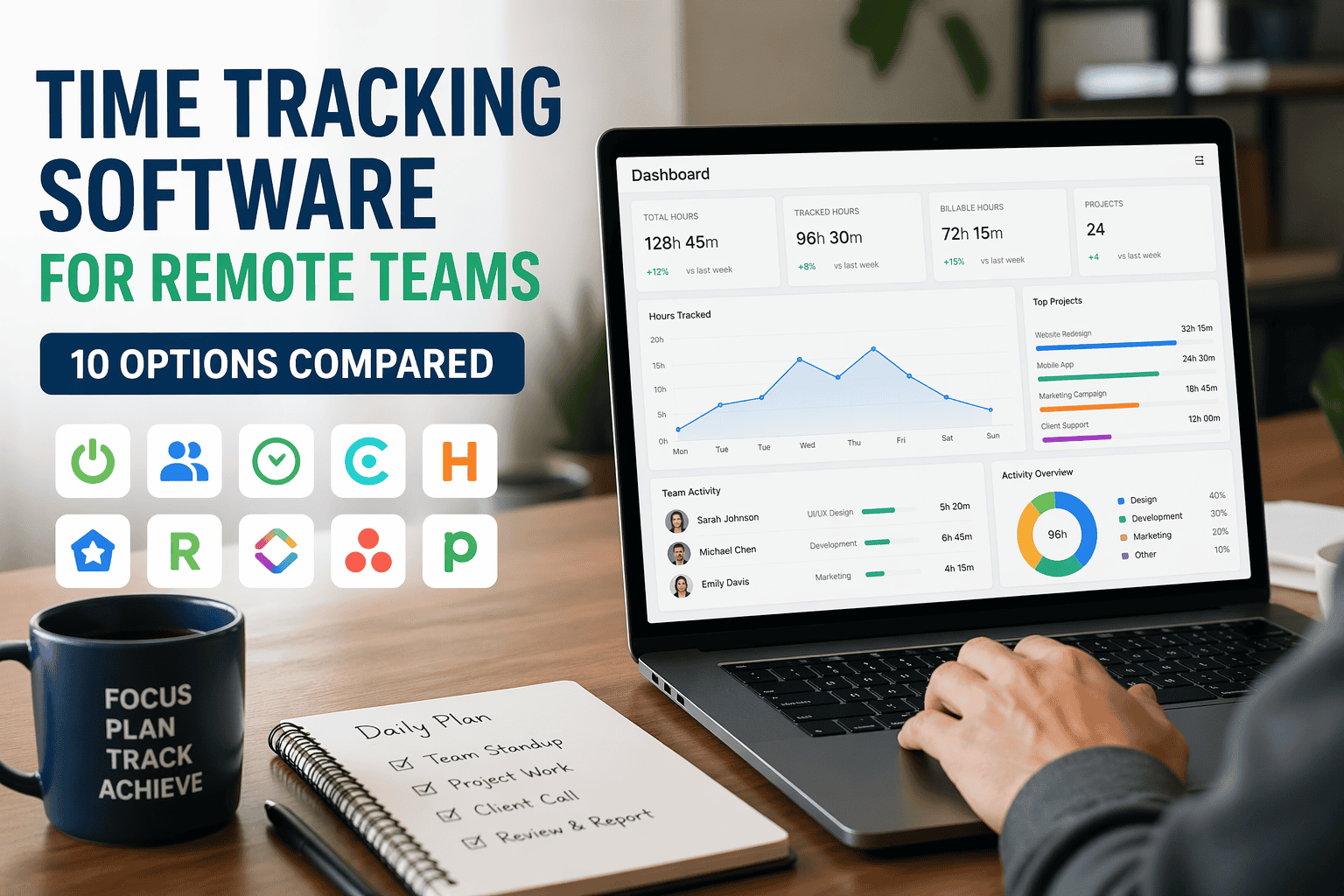
The best time tracking software for remote teams in 2026 depends on your primary need: Toggl Track for simplicity, Hubstaff for productivity monitoring, Harvest for billable-hours workflows, and Clockify for zero budget. No single tool wins across every use case — but this guide gives you the exact decision framework to pick the right one for your situation.
Remote work sounds flexible — until you realize you have no visibility into productivity, billable hours, or where your team’s time is actually going.
Here’s the truth most managers won’t say out loud: most remote teams don’t fail because of laziness. They fail because there’s no system to track work intelligently. Time disappears into Slack threads, context-switching, and meetings that could have been emails.
I’ve implemented time tracking systems across companies ranging from 8-person agencies to 3,000-person distributed engineering orgs. After years of watching teams adopt the wrong tools — and suffer the consequences — I’ll tell you exactly what works, what doesn’t, and which time tracking software for remote teams you should actually be looking at in 2026.
Why Time Tracking Matters for Remote Teams
Most people assume time tracking equals surveillance. That framing is the first mistake — and it’s the one that kills adoption before you even start.
Good time tracking is a profitability and planning tool, not a spy system. When implemented correctly, it solves four real business problems simultaneously:
- Billing accuracy — for agencies and consultants billing hourly, untracked time is revenue leakage. A 10-person team losing one unbilled hour per person per week at $125/hour is losing $65,000 a year.
- Project estimation — you can’t accurately price future work if you don’t know how long current work actually takes. Most teams underestimate by 20–40%.
- Team productivity insights — not “is Sarah working?” but “are we over-allocating engineering to meetings while design is under-resourced?”
- Burnout prevention — remote workers are notoriously bad at logging off. Time data surfaces workload imbalances before someone hits a wall.
In my experience advising Workday implementations for mid-sized firms, the teams that resist time tracking the most are usually the ones where managers are most uncomfortable with what the data will reveal — not about employees, but about their own project planning gaps. Good time tracking is a mirror. Some managers don’t like what they see.
What to Look for in Time Tracking Software
Before you start comparing tools, you need to understand what problem you’re actually trying to solve. Not all time tracking software is built for remote teams — many tools assume people are in the same office, same timezone, same device ecosystem.
Here are the five features that actually matter for distributed teams:
1. Automatic vs. Manual Tracking
Manual tracking (start/stop timers) requires discipline but gives employees a sense of control — which is critical for adoption. Automatic tracking captures app and website usage without any action needed, which is useful for accountability but can feel invasive. Most mature remote teams use both: automatic as a baseline, manual for project attribution.
2. Integrations With Your Existing Stack
A time tracking tool that doesn’t connect to where work happens is just another app to ignore. Look for native integrations with your project management system (Jira, Asana, ClickUp, Linear) and communication tools (Slack, Teams). The best setup is one where tracking starts automatically when a task is opened.
3. Reporting That Surfaces Decisions, Not Raw Data
Raw hours logged is meaningless. You need reports that tell you: which projects are over budget, which team members are consistently overloaded, and where your most profitable work is coming from. If the reporting feels like it was designed for accountants rather than managers, it’ll collect dust.
4. Employee Monitoring (Use With Extreme Care)
Screenshot tracking and activity-level monitoring exist on a spectrum. Hubstaff and Time Doctor have it. Toggl and Harvest don’t. My honest take: monitoring features are appropriate for outsourced teams or contractors in early engagements — not for salaried employees with established performance records. Over-monitoring kills morale faster than almost anything else.
5. Pricing vs. Actual ROI
A $12/user/month tool that your team ignores is more expensive than a $25/user/month tool they actually use. Factor in adoption rate when calculating ROI, not just the sticker price.
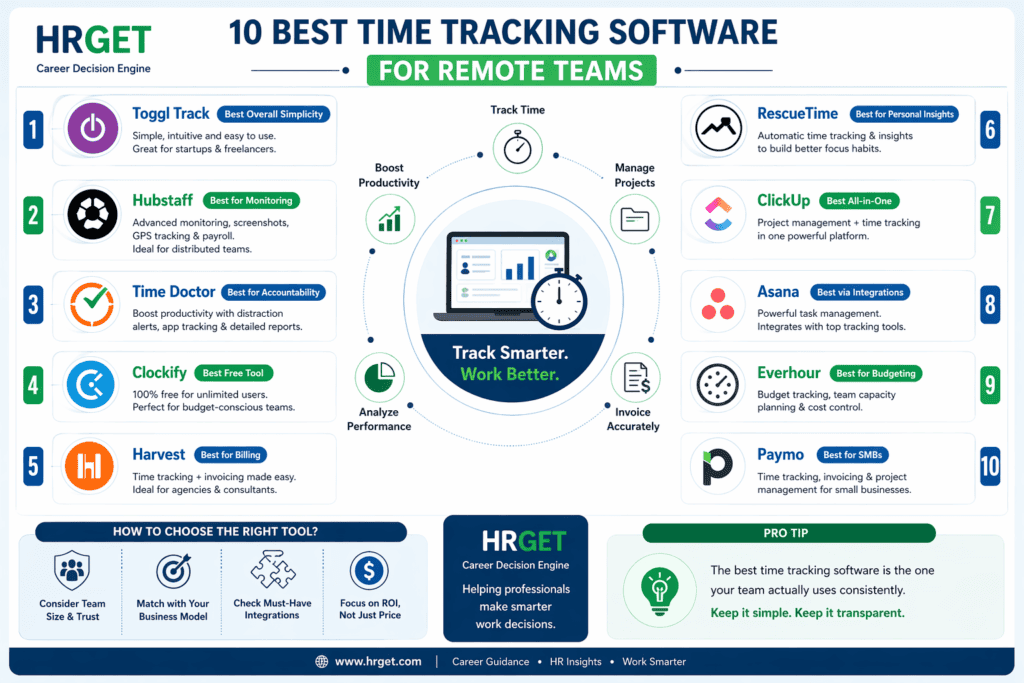
10 Best Time Tracking Software for Remote Teams (Compared)
Best Overall Simplicity
Toggl is the tool I recommend first to any team that’s never used time tracking before. The UI is genuinely frictionless — you can start tracking in under 30 seconds with no training. For small teams and freelancers, it hits every essential requirement without overwhelming anyone.
What sets Toggl apart in 2026 is its browser extension and calendar integration. Time entries can be created directly from Google Calendar events, which means your team isn’t switching apps to log work — it’s embedded in their existing workflow. Reporting is clean and visual, not spreadsheet-style.
- Pros
- Zero learning curve
- Excellent mobile app
- Solid free tier (up to 5 users)
- Cons
- No employee monitoring
- Limited project budgeting features
Best for Productivity Monitoring
Hubstaff is the go-to tool when you need to know how work is being done, not just how many hours were logged. It captures screenshots at set intervals, measures keyboard and mouse activity, and gives managers an activity-level score per employee. It also has GPS tracking, which matters for field teams.
For agencies managing outsourced developers in India, the Philippines, or Eastern Europe, Hubstaff is an industry standard. The payroll automation feature is genuinely useful — you can set hourly rates and generate payroll directly from logged hours. That saves real administrative time at month-end.
- Pros
- Deep monitoring features
- Payroll + invoicing built-in
- GPS for field teams
- Cons
- Can feel intrusive to employees
- UI is dated compared to Toggl
Best for Accountability
Time Doctor takes accountability further than Hubstaff with distraction alerts — it actively nudges employees back on task when it detects non-work app usage. This sounds helpful on paper, but I’ve seen it backfire with senior developers who found it condescending. Use it for teams where you genuinely need behavioral accountability, not just time logs.
The website and app usage reports are genuinely detailed. You’ll see not just “3 hours in Chrome” but which specific sites, for how long, and whether they’re classified as productive or unproductive based on your company configuration.
- Pros
- Granular website/app tracking
- Strong reporting
- Payroll integrations
- Cons
- High employee resistance risk
- Steeper setup than Toggl/Clockify
Best Free Option
Clockify’s free tier is genuinely competitive — unlimited users, unlimited projects, timesheet management, and reporting dashboards at zero cost. For bootstrapped startups or nonprofits, that’s a compelling proposition that no other serious tool matches.
The paid plans ($4.99–$14.99/user/mo depending on tier) add features like project budgeting, attendance tracking, and expense management. The UI is functional but feels utilitarian compared to Toggl. That said, if budget is the constraint, Clockify’s free tier gets the job done.
- Pros
- Unlimited users free
- Solid feature depth
- Good API for custom integrations
- Cons
- UI feels dated
- Limited monitoring features
Best for Billing & Invoicing
Harvest is built around one core workflow: time tracked → invoice generated → payment received. For client-service businesses, this is exactly what you need. You can set billable rates by person, project, or task type, and Harvest automatically calculates what to invoice. It also integrates with Stripe and PayPal for payment collection directly from the invoice.
Where Harvest falls short is anything beyond billing. There’s no employee monitoring, no advanced reporting on productivity patterns, and no budgeting alerts until you’re already over. Think of it as the accounting tool that also tracks time — not the other way around.
- Pros
- Seamless time-to-invoice workflow
- Integrates with 50+ tools
- Clean, professional invoices
- Cons
- No monitoring
- Budget alerts are limited
Best for Personal Productivity
RescueTime runs silently in the background and captures everything — every app, every website, every minute — without the user doing anything. The productivity scoring system categorizes your time as Very Productive, Productive, Neutral, Distracting, or Very Distracting, and gives you a daily score. For founders, independent contributors, and knowledge workers who want an honest look at where time actually goes, it’s revelatory.
The FocusTime feature blocks distracting sites during deep work sessions, which makes RescueTime also act as a productivity tool, not just a tracker. The limitation is that team-level reporting is thin — this is fundamentally a personal tool that happens to have a team dashboard.
- Pros
- Zero user effort to track
- Honest productivity insights
- Focus/blocking feature included
- Cons
- Weak team management features
- No billing/invoicing
Best All-in-One
ClickUp’s native time tracking is powerful precisely because it’s embedded directly in your task management system. There’s no context switching — you open a task, start a timer, and the time logs against that specific piece of work automatically. For teams already using ClickUp as their project management hub, this is the path of least resistance.
The downside is ClickUp’s notorious complexity. If your team hasn’t already adopted it, don’t introduce it just for time tracking — the learning curve is steep and adoption often stalls. But if you’re already a ClickUp shop, the built-in tracking is genuinely excellent and eliminates the need for a separate tool entirely.
- Pros
- No extra tool needed if using ClickUp
- Task-based tracking is seamless
- Powerful reporting dashboards
- Cons
- Overwhelming for new users
- Overkill if you just need time tracking
Best for Structured Workflows
Asana doesn’t have native time tracking — but it integrates seamlessly with Toggl, Harvest, and Everhour, making it a strong hub for structured teams. The value here is that Asana’s task and project management is best-in-class for teams with complex workflows, and the right time tracking integration drops in cleanly without disrupting anything.
If your team is already heavily Asana-dependent, adding Toggl via the Asana integration takes about 20 minutes to set up and gives you time data tied directly to tasks. That’s usually the better call than switching to a different project management tool just to get native tracking.
- Pros
- Best-in-class task management
- Strong integration ecosystem
- Excellent for team coordination
- Cons
- No native time tracking
- Requires a separate tool
Best for Project Budgeting
Everhour fills a specific gap that most tools miss: real-time budget tracking at the project level. As your team logs hours, Everhour subtracts them from the project budget and alerts you when you’re approaching the limit. For agencies managing five or more client projects simultaneously, this prevents the budget overruns that quietly destroy margins.
The integration with Asana, Jira, ClickUp, and Basecamp is deep — not just a basic API connection. Time estimates sit inside your task cards, and actual vs. estimated comparisons are surfaced in the reporting. It’s purpose-built for project-centric billing workflows.
- Pros
- Real-time budget vs. actual tracking
- Deep project tool integrations
- Team capacity planning
- Cons
- Smaller tool ecosystem than Toggl
- Less known, fewer community resources
Best for Small Business Management
Paymo bundles time tracking, project management, and invoicing into a single platform aimed squarely at small businesses and freelancers who don’t want to stitch together three separate tools. The Auto Scheduler feature — which assigns tasks based on team availability — is unusual and genuinely useful for managers handling resource allocation manually.
At $11.95/user/mo for the Business plan, Paymo is competitively priced against Harvest plus a project management tool combined. If you’re a solo consultant or running a small team that does everything from proposal to invoice in one workflow, Paymo is worth a serious look.
- Pros
- All-in-one PM + invoicing + tracking
- Auto scheduling feature
- Competitive pricing
- Cons
- Less polished than Harvest for billing
- Fewer integrations than ClickUp
Quick Comparison Table
| Tool | Best For | Monitoring | Billing | Free Tier | Pricing (from) |
|---|---|---|---|---|---|
| Toggl Track | Simplicity / Startups | No | Basic | Yes (5 users) | $9/user/mo |
| Hubstaff | Agencies / Outsourced teams | Yes | Yes | No | $7/user/mo |
| Time Doctor | Accountability / BPO | Yes | Limited | No | $7/user/mo |
| Clockify | Budget-zero teams | Limited | Basic | Yes (unlimited) | Free |
| Harvest | Client billing | No | Yes | Yes (1 user) | $12/user/mo |
| RescueTime | Personal productivity | Auto only | No | No | $12/mo |
| ClickUp | All-in-one PM teams | Limited | Limited | Yes | $7/user/mo |
| Asana | Structured workflows | No (native) | Via integration | Yes | $10.99/user/mo |
| Everhour | Project budgeting | No | Yes | No | $8.50/user/mo |
| Paymo | SMB all-in-one | Limited | Yes | Yes (1 user) | $5.90/user/mo |
Real Scenario: Which Tool Should You Choose?
Sarah runs a 12-person digital marketing agency. Her team is spread across New York, London, and Bangalore. Three of her Bangalore contractors are on hourly rates. Her two New York account managers are salaried but bill hours to clients. She’s losing roughly $4,000–$6,000 per month in untracked billable time — she can feel it, but can’t prove it yet.
What should she use? Harvest for her client-billing workflow (NY + London team), and Hubstaff for the Bangalore contractors where she needs activity verification for client compliance. Both connect to her Asana project board. Setup takes about a day. Within 30 days she’ll have data on exactly where the leakage is.
Here’s how to think about tool selection by context:
Startup with 5 remote employees, no client billing
Start with Toggl Track (free tier). You need project-level visibility, not monitoring. The free plan covers everything you need until you’re over 5 users or need billing features.
Agency billing clients hourly, 10–30 people
Harvest is the right call for billing workflow. Add Everhour if you need real-time budget alerts by project. If you’re already on Asana, connect Everhour via the native Asana integration.
Outsourced dev team in India or the Philippines
Hubstaff. Clients often contractually require proof of work for outsourced teams, and Hubstaff’s screenshot and activity reports satisfy that requirement. Brief your team transparently on what’s tracked and why.
Founder managing personal productivity
RescueTime running silently in the background. Set a daily goal of 5+ productive hours, review your weekly report every Monday, and adjust calendar blocks accordingly.
Engineering team on ClickUp with complex sprints
Use ClickUp’s native time tracking. Don’t add another tool — reduce the number of context switches instead.
Smart Strategy: What Most Teams Get Wrong
Most teams pick time tracking tools based on a feature comparison matrix. That’s the wrong frame entirely.
The right question isn’t “which tool has the most features?” It’s “which tool will my team actually use consistently for 90 days?”
Run a 2-week pilot with 3–5 people before rolling out to the whole team. Track adoption rate, not just usage. If fewer than 70% of your pilot group is actively logging time by week two, the tool has a friction problem — not the people. Switch tools, don’t force behavior change.
Here’s the framework I use with every team I advise:
Step 1: Define your primary use case (pick one)
- Client billing accuracy → Harvest or Everhour
- Team productivity visibility → Hubstaff or Time Doctor
- Project cost management → Everhour or ClickUp
- Personal accountability → Toggl or RescueTime
Step 2: Map your trust level to monitoring intensity
High-trust teams with established performance records do not need screenshot monitoring. Period. If you’ve hired well, document that trust by starting with light tracking (Toggl, Clockify). Add monitoring features only if a specific accountability issue emerges — not as a default policy.
Step 3: Connect to where work already happens
The best time tracking system is the one embedded in your existing workflow. If your team lives in Jira, use Everhour or ClickUp. If they live in Google Calendar, use Toggl. Don’t create a new destination app — attach to an existing behavior.
Common Mistakes to Avoid
1. Over-monitoring full-time salaried employees
Screenshot tracking and activity levels are appropriate for hourly contractors, not salaried staff. Applying Hubstaff-level monitoring to your senior engineers or account managers signals distrust and will cost you retention. I’ve seen this decision alone trigger 2–3 resignations in teams under 15 people.
2. Choosing complexity before establishing habits
A startup implementing Hubstaff with full monitoring, GPS tracking, and payroll automation before they’ve even established a basic logging habit is setting up for zero adoption. Start with the simplest tool that solves your immediate problem. Add complexity after the habit is established.
3. Ignoring integrations until it’s too late
If you choose a time tracking tool that doesn’t connect to your project management system, your team will end up entering the same data twice. That double-entry friction is enough to kill adoption within 60 days. Always verify native integrations before committing.
4. Collecting data but never reviewing it
Time tracking data without a monthly review ritual is pure infrastructure cost. Block 30 minutes each month to review where hours went by project and by person. Look for three things: scope creep, overloaded team members, and tasks taking consistently longer than estimated. Those three insights alone will pay for the tool many times over.
Final Verdict
🏁 HRGet.com Verdict: Best Time Tracking Software for Remote Teams (2026)
- Best overall: Toggl Track — cleanest UI, easiest adoption, strong free tier
- Best free option: Clockify — unlimited users, solid depth, zero cost
- Best for monitoring/outsourced teams: Hubstaff — industry standard for accountability workflows
- Best for billing & invoicing: Harvest — time-to-invoice workflow is unmatched
- Best for project budget control: Everhour — real-time budget alerts built for agencies
- Best all-in-one: ClickUp (if you’re already using it)
- Best for personal productivity: RescueTime — silent, honest, revelatory
The honest truth? There’s no universally “best” time tracking software for remote teams. The right tool is the one that fits your team’s trust level, business model, and existing workflow — and that your team will actually use. A perfect tool with 20% adoption is worse than a decent tool with 90% adoption.
Start simple. Get the habit established. Add sophistication as the data proves you need it.
FAQs: Time Tracking Software for Remote Teams
Yes, in most jurisdictions — but with conditions. In the US, employers can legally monitor work activity during work hours on company-owned devices. In the EU and UK, GDPR and the UK Data Protection Act 2018 require transparent disclosure and a legitimate business purpose. In India, there’s no single federal employee monitoring law, but implied consent and internal policy documentation are standard practice. The safest approach everywhere: tell your team upfront what’s being tracked and why.
Poorly implemented tracking can hurt morale and output. But research from Harvard Business Review and Atlassian’s State of Teams report consistently shows that visibility into time allocation — when framed as a planning tool, not surveillance — actually helps teams work smarter. The key variable is trust. If employees feel monitored, they disengage. If they see time data as a resource-planning tool, they engage more intentionally.
Clockify is the strongest free option in 2026. It offers unlimited users, unlimited projects, timesheet management, and reporting dashboards at no cost. The free tier is genuinely usable, not a stripped-down trial. For teams under 10 people that just need basic tracking without billing or monitoring, Clockify is hard to beat.
Yes — but start light. A 5-person startup doesn’t need screenshots and GPS tracking. It needs to know where time is going so founders can spot resource leaks and scope creep early. Toggl Track or Clockify is the right entry point. Add monitoring features only if you have a genuine accountability problem, not as a default setup.
Manual tracking (like Toggl’s one-click timer) gives employees control and tends to have higher adoption. Automatic tracking (like RescueTime) captures data without friction — useful for billable hours audits or productivity analysis. Most high-performing remote teams use both: automatic tracking as a baseline, manual timers for project-specific billing.
Absolutely — and the math is straightforward. A 10-person agency losing one unbilled hour per person per week at $125/hour is losing $65,000 annually. Tools like Harvest and Everhour tie time directly to invoices so nothing falls through. Agencies that implement time tracking properly typically see billing accuracy improve by 15–25% within the first quarter.
Some do — but the resistance is usually to surveillance-style tools, not tracking itself. Developers who use task-based tracking (like ClickUp’s native timers or Toggl integrated with GitHub) rarely push back, because the data helps them demonstrate output and protect against scope creep. The tools that cause friction are the ones that take screenshots every 10 minutes.
Looking for a full HR tech stack for your remote team? Read our guide on the best HRIS software for small businesses.

David Schneider : HR Technology Consultant & Former Head of People Systems | Former SAP SuccessFactors Implementation Lead | HR Tech Consultant (Workday, ADP) | 17+ Years in People Systems
David Schneider has spent 17 years on the implementation side of HR technology — the part vendors never show you in the demo. As a former SAP SuccessFactors implementation lead and Head of People Systems, he has designed and deployed HRIS, payroll, ATS, and performance management systems for organisations ranging from 1,000 to 50,000 employees across Europe and North America. He has advised enterprise clients on Workday and ADP migrations, untangled integration disasters, and helped HR teams understand why they’re overpaying for tools they’re only using at 30% capacity. Based between Berlin and New York, David writes for HRGet.com to give buyers the honest, implementation-level perspective that analyst reports and vendor case studies never will.