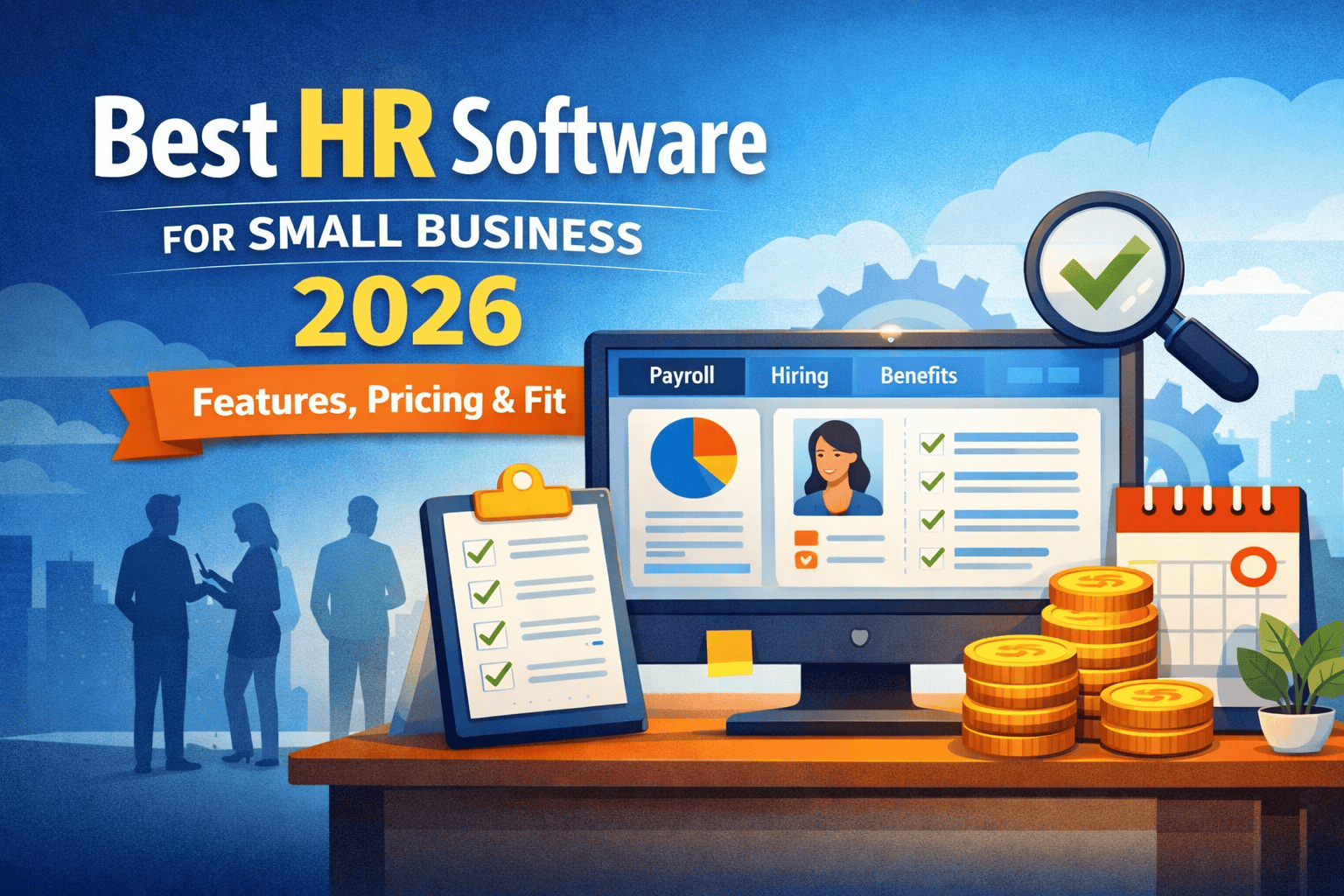
If you’re running a small business and your HR “system” is still a combination of spreadsheets, WhatsApp messages, and calendar reminders — this is the article you needed six months ago.
The best HR software for small business isn’t about having a fancy dashboard. It’s about fixing the exact pain points that are already costing you time, money, and good employees. And in 2026, with hiring markets tighter and labor compliance requirements growing more complex across the US, India, and the UK, getting this right is no longer optional.
I’ve worked with HR systems across companies ranging from 8 people to 800. Here’s what I’ve actually seen work — and what’s mostly noise.
What Small Businesses Actually Need From HR Software
Here’s where most articles go wrong — they treat small businesses like scaled-down enterprises. You’re not. Your problems are different.
You don’t need an AI-powered succession planning module. You need payroll to run on time without you manually calculating tax deductions at 11pm on a Friday.
The core jobs your HR software must handle — no exceptions:
Payroll processing with tax compliance. In the US, this means federal + state + local taxes. In India, it means PF, ESI, and professional tax. Getting this wrong isn’t just painful — it’s a legal liability.
Employee records in one place. Offer letters, contracts, performance notes, leave history. Not in three different folders across two laptops.
Onboarding workflows. A good onboarding experience reduces 90-day turnover by a significant margin. I’ve seen companies lose ₹4–6 LPA hires in the first month purely because there was no structured first week.
Leave and attendance tracking. Manual leave approvals over WhatsApp break down the moment you cross 10 people.
Basic compliance documentation. Signed NDAs, offer letters with correct notice period clauses, statutory declarations — these are your legal shields.
Everything beyond this is a nice-to-have. Start here.
The 5 Best HR Software Tools for Small Business in 2026
These aren’t ranked by marketing budget or affiliate commission. They’re ranked by actual fit for small teams.
Gusto — Best All-in-One for US Small Businesses
If you’re a US-based team between 5 and 50 people, Gusto is the default choice for a reason — it genuinely handles everything in one place.
Payroll runs almost automatically once you set it up. Federal and state taxes are filed on your behalf. Benefits like health insurance and 401(k) are built in. The onboarding flow is clean enough that new hires can complete paperwork before their first day.
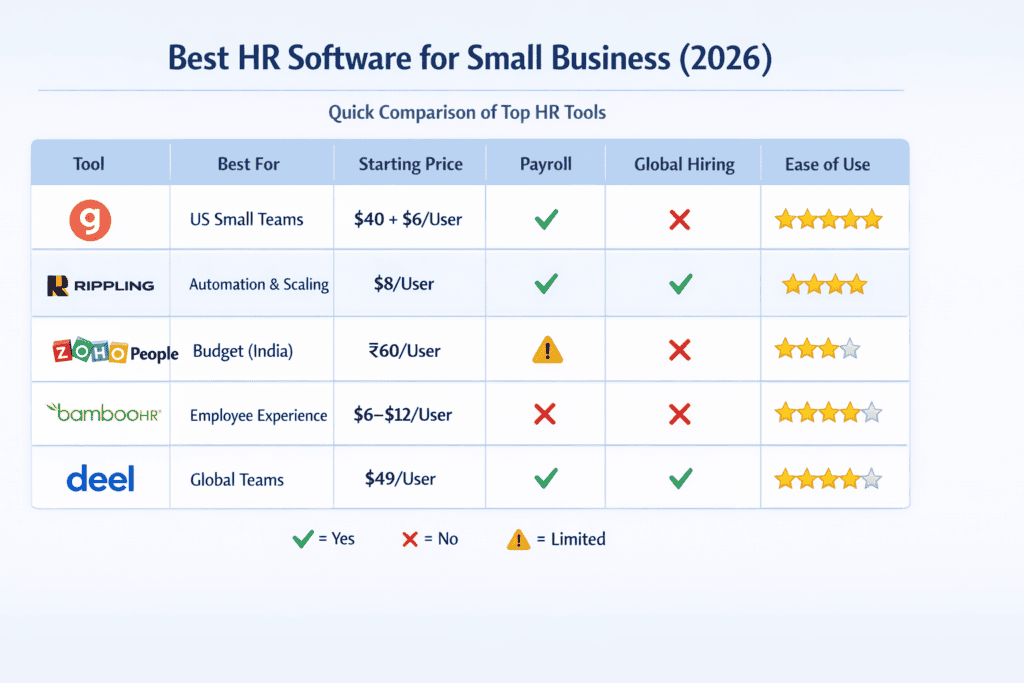
Pricing (2026): ~$40/month base + $6 per employee
Best for: US-based teams that want one tool to handle payroll, benefits, and basic HR without a dedicated HR hire.
Honest caveat: Gusto isn’t the cheapest option as you scale. At 40 employees, you’re looking at $280/month — which is still reasonable, but start budgeting for it.
Rippling — Best for Fast-Growing Startups That Need Automation
Rippling is in a different category. It’s not just HR software — it’s an operating system for your workforce. It connects HR, payroll, IT (device management, app access), and finance workflows in a way no other tool does.
The automation is genuinely impressive. When you onboard someone, Rippling can automatically provision their laptop, create their email, add them to relevant Slack channels, and enroll them in payroll — all triggered from a single workflow.
Pricing (2026): Starts ~$8/user/month, but modules add up fast
Best for: Tech startups scaling from 20 to 200 employees who want to automate ops, not just manage them.
Honest caveat: If you just need basic HR, Rippling’s cost and complexity is overkill. It rewards teams that actually use the automation features.
Zoho People — Best Budget Option for India and Cost-Conscious Teams
For India-based small businesses — especially those in Tier 1 cities running on lean budgets — Zoho People is hard to beat on value. It handles leave tracking, attendance, employee databases, and performance reviews at a fraction of what Western tools charge.
The UI isn’t as slick as Gusto or BambooHR, and payroll requires a separate integration with Zoho Payroll (which works well for Indian compliance — PF, PT, ESI — but needs initial setup). Once configured, it’s solid.
Pricing (2026): ₹60–₹250 per employee/month depending on plan (~$1–$3)
Best for: India-based teams of 10–100 employees who need structured HR without enterprise pricing.
Honest caveat: Support response times can vary. Set aside time for initial configuration — it’s not plug-and-play.
BambooHR — Best for Teams That Care About Employee Experience
BambooHR’s real strength is in how employees experience the tool. The self-service portal is clean, the onboarding checklists are thoughtful, and the reporting on headcount and turnover is genuinely useful for founder-led companies trying to understand their people data.
It doesn’t have native payroll — you’ll need to integrate with a payroll tool like Gusto or ADP. That’s an extra step, but for companies where culture and retention matter more than saving $30/month, it’s worth it.
Pricing (2026): Custom pricing, typically $6–$12 per employee/month
Best for: Companies of 15–100 employees in the US or UK that prioritize structured performance management and employee experience.
Deel — Best for Remote-First and Globally Distributed Teams
Hiring a developer in Portugal, a designer in the Philippines, and a marketing lead in Nigeria while you’re headquartered in Austin? That’s exactly what Deel was built for.
It handles local compliance, contractor agreements, EOR (Employer of Record) arrangements, and multi-currency payroll in 150+ countries. Nothing else on this list comes close for global teams.
Pricing (2026): Contractors at ~$49/month per contractor. EOR (full-time international employees) at $500+/month per employee.
Best for: Remote-first companies with international contractors or employees.
Honest caveat: It’s expensive for what you get on a per-head basis. Only worth it if you’re genuinely hiring across borders.
Feature-by-Feature Breakdown: What Matters and What Doesn’t
Vendors love burying you in feature lists. Here’s how to cut through it.
Non-negotiable features — if a tool doesn’t have these, walk away:
Automated payroll with tax filing. Employee self-service portal (employees should be able to check their own payslips and leave balances). Document storage and e-signatures. Basic reporting on headcount and leave.
High-impact features that genuinely improve your operations:
Structured onboarding workflows with task checklists. Leave approval workflows. Time and attendance tracking with manager approvals. Integration with your accounting tool (QuickBooks, Tally, Xero).
Nice-to-have features that you probably don’t need yet:
Advanced performance management (fine once you cross 50 people). Engagement surveys and pulse checks. Predictive attrition analytics. Multi-level approval hierarchies.
Here’s the trap: many vendors bundle nice-to-haves into premium tiers and make you feel like you need them. You don’t — not at this stage.
Real Pricing: What You’ll Actually Pay
Forget what the pricing page says. Here’s the realistic picture after implementation, integrations, and the features you actually need:
| Team Size | Expected Monthly Cost (US) | Expected Monthly Cost (India) |
|---|---|---|
| 1–10 employees | $40–$100 | ₹2,000–₹5,000 |
| 10–25 employees | $150–$350 | ₹5,000–₹15,000 |
| 25–50 employees | $300–$600 | ₹15,000–₹35,000 |
| 50+ employees | $600–$2,000+ | ₹35,000–₹1,00,000+ |
Hidden costs that vendors bury in the fine print:
Payroll tax filing fees (some tools charge extra per filing). Offboarding workflows in premium tiers only. Compliance update features locked behind enterprise plans. Per-country pricing for global tools. API access only available on higher-tier plans.
My rule: always demo the tool with your actual use case, not the vendor’s polished walkthrough.
Real Scenario: How to Match Your Stage to the Right Tool
Let me walk you through four realistic situations I’ve seen play out.
Scenario A: 12-person startup in Bangalore, seed-funded They were using Google Sheets for attendance and paying salaries manually through bank transfers with a chartered accountant doing PF calculations each month. Two salary errors in three months had already damaged trust with early employees.
The fix: Zoho People + Zoho Payroll. Setup took about two weeks including configuration of PF, PT, and ESI. Monthly salary errors dropped to zero. Cost: ~₹8,000/month.
Scenario B: 22-person SaaS company in Austin, Series A Payroll was handled by Gusto from day one, but as they started hiring their first remote engineers in Europe, Gusto couldn’t handle international compliance. They added Deel for two contractors in Germany.
The fix: Gusto for US employees, Deel for international contractors. Not the cleanest setup, but it works until they hire a dedicated HR lead who can rationalize the stack.
Scenario C: 45-person e-commerce company in London BambooHR for employee records and onboarding, Moorepay for payroll (UK-specific). The HR manager spent most of her time on onboarding and performance management, not payroll — so splitting the tools made sense.
Scenario D: 8-person fully remote agency, founder based in Dubai Contractors in India, Philippines, and Colombia. Tried to manage everything through Wise transfers and PDF contracts. A contractor dispute in 2025 with no proper agreement cost them significantly in legal consultation.
The fix: Deel for all contractors. More expensive than ad hoc management, but the compliance documentation alone was worth it.
The Insider View: What Most HR Software Buying Guides Won’t Tell You
Look, I’ll be direct about something the listicles never say.
The tool you choose matters less than whether your team actually uses it.
I’ve seen companies with Workday licenses (enterprise-grade) where managers were still sending leave requests over WhatsApp because “it’s easier.” The software becomes shelfware within three months.
Before you buy anything, ask two questions:
First — who is the actual daily user? If it’s your admin or office manager (not you), they need to test it and sign off. Their friction is what kills adoption.
Second — what’s your single biggest HR pain point right now? Don’t buy a suite if you only need payroll automation. The breadth of a tool doesn’t matter if 80% of it sits unused.
And one more thing nobody says in buying guides: the vendor’s customer support quality at your company size is critically important. Gusto has good SMB support. Some larger platforms treat sub-50-employee customers as low priority. Check G2 and Capterra reviews specifically filtered to “small business” before you sign anything.
Common Mistakes Small Businesses Make When Choosing HR Software
Mistake 1: Buying based on what you might need instead of what you need now. You’re 15 people. You don’t need a succession planning module. You need payroll to run without you touching it. Stay focused.
Mistake 2: Choosing the cheapest option and ignoring the time cost. A $10/month tool that requires two hours of manual work per payroll cycle is more expensive than a $60/month tool that runs automatically. Calculate total cost, not just license cost.
Mistake 3: Not testing payroll before committing. Always run a parallel payroll cycle during your trial. Process one payroll in the new system alongside your existing method and compare outputs. Non-negotiable step.
Mistake 4: Ignoring regional compliance requirements. A US-focused tool will not handle Indian PF or UK PAYE correctly. Make sure the tool you’re evaluating has been built for — or explicitly supports — your jurisdiction.
Mistake 5: Making the decision alone. Your finance lead, your admin, and your most affected employees should all have input. HR software decisions made in isolation by founders almost always miss something critical in day-to-day workflow.
How to Choose the Right HR Software in 4 Steps
Step 1: Identify your single biggest HR pain point. Not three pain points. One. Is it payroll errors? Onboarding chaos? Leave management? Start there.
Step 2: Match your geography and team size. US, <25 employees → Gusto. India, budget-conscious → Zoho People. Global contractors → Deel. Scaling fast with automation needs → Rippling. Culture-first, US/UK → BambooHR.
Step 3: Run a real-world trial. Use the free trial period to complete an actual workflow — not a demo. Run payroll. Onboard a test employee. Approve a leave request. See where it breaks.
Step 4: Check integration compatibility. Does it connect to your accounting software? Your job board? Your Slack workspace? Integration gaps create manual work, which defeats the entire purpose.
Pro Tip: Before signing an annual contract, ask the vendor: “What’s your average response time for support tickets from companies our size?” The answer tells you more than their feature list ever will.
Frequently Asked Questions
What is the best HR software for small businesses in 2026? For most US-based small businesses, Gusto remains the strongest all-in-one option — it handles payroll, benefits, and basic HR in one place at a price point that makes sense for teams under 50. For India-based companies, Zoho People + Zoho Payroll offers the best value. For globally distributed teams, Deel is the only tool that genuinely handles multi-country compliance without a workaround.
How much does HR software cost for a small business? Realistically, expect $40–$150/month for teams under 15 employees in the US, or ₹3,000–₹12,000/month for comparable teams in India. Pricing scales per employee, and most tools have a base fee. Factor in $0–$50/month for integrations (payroll filing, accounting sync) on top of that.
Do I really need HR software if I have fewer than 10 employees? Yes — but a lighter version. At 5–10 people, you at minimum need compliant payroll processing, signed offer letters stored somewhere organized, and a leave tracking system that isn’t a shared Google Calendar. The cost of not having this (one payroll error, one compliance miss) far exceeds a $40/month subscription.
Can free HR software work for a small business? Free tools (like OrangeHRM or basic Zoho plans) work for very specific, simple needs — but they almost always lack automated payroll, which is the highest-risk area for small businesses. If your payroll is simple (all contractors, paid via bank transfer, no benefits), a free tool can bridge the gap. For any employee on a formal payroll, invest in a paid tool.
Which HR software is best for Indian startups in 2026? Zoho People paired with Zoho Payroll is the strongest Indian-market option for teams of 10–100. It handles PF, ESI, and professional tax natively, integrates with Tally and QuickBooks, and costs a fraction of Western alternatives. For larger teams or those with complex workflows, Darwinbox and Keka are worth evaluating — both are India-built and designed for Indian compliance from the ground up.
What’s the difference between HRIS, HRMS, and payroll software? HRIS (HR Information System) is your employee database — records, documents, org charts. HRMS (HR Management System) adds workflows — onboarding, performance, leave. Payroll software specifically handles salary calculations and tax filings. Most modern tools like Gusto or Rippling blend all three. When a vendor says “HRMS,” check whether payroll is included or an add-on.
When should I upgrade or switch HR software? Three clear signals: payroll errors are increasing (even one per quarter is too many). Your HR admin is spending more than 20% of their week on manual data reconciliation. You’re expanding to a new country or state and your current tool doesn’t support the compliance requirements there. Don’t wait for the fourth signal — by then you’ve already paid for it.
Final Verdict
Here’s the bottom line, no hedging.
The best HR software for small businesses isn’t the one with the most features — it’s the one that eliminates the exact friction slowing your team down right now.
Under 20 employees in the US? Start with Gusto. It’s not perfect, but it’s the safest choice you can make and the easiest to onboard. India-based and budget-conscious? Zoho People will serve you well for longer than you’d expect. Hiring across borders? Don’t improvise — get Deel before the first international contractor dispute forces your hand.
The one mistake I keep seeing founders make in 2026: delaying the decision until something breaks. A payroll error, a compliance audit, a frustrated HR manager — these are expensive wake-up calls. Pick a tool this month, run a real trial, and get it configured before your next payroll cycle.
Your future HR headaches are already queued up. The software just determines how bad they get.
Looking for help structuring your company’s HR policies before rolling out new software? Check out our guide on HR policy basics for growing teams — a good foundation makes any tool work better.

Victoria Hale | Former Partner, Freshfields Bruckhaus Deringer | Employment Law Specialist | 20+ Years Advising Multinationals & Executives
Author: Victoria Hale spent over two decades as an Employment Law Partner at Freshfields Bruckhaus Deringer — one of the world’s most prestigious Magic Circle law firms — advising multinational corporations and senior executives on some of the most complex employment disputes in the US and Europe. Her practice covered wrongful termination litigation, executive exits, non-compete enforcement, FLSA compliance, and cross-border workforce restructuring under EU labour law. Now based between London and New York, Victoria writes for HRGet.com to close the gap between legal theory and how employment law actually plays out in the real world — for employees who need to know their rights before it’s too late.