Here’s what I tell every founder who asks me about the best payroll software for startups: the wrong pick doesn’t just cost you money — it costs you trust. Miss a payroll run, file in the wrong state, or misclassify a contractor, and you’re not just dealing with fines. You’re dealing with employees who quietly update their LinkedIn.
I’ve implemented or evaluated payroll systems across dozens of companies — from a 6-person seed-stage team in Berlin to a 300-person Series C scaling across four countries. The patterns are always the same: founders either overbuy (Rippling at 8 employees, really?) or underbuy (Google Sheets and prayer at 40 people). Both are expensive mistakes.
This guide cuts through the noise. I’ll tell you exactly which tool fits which stage, what you’ll actually pay, and — just as importantly — what to avoid. No affiliate fluff. Just the framework I’d use if it were my startup on the line.
What Startups Actually Need from Payroll Software
Most payroll software reviews lead with feature checklists. I’ll start somewhere different: with what actually breaks when you pick the wrong tool.
At the 0–10 employee stage, your biggest risks are tax compliance and contractor classification. You’re probably mixing full-time hires with freelancers. You don’t have an HR person. The founder — or one overwhelmed ops hire — is running everything. You need a tool that’s impossible to screw up and handles federal and state tax filings automatically. Anything beyond that is nice-to-have noise.
At 10–30 employees, the calculus shifts. Now you’re offering benefits, managing multi-state filings, and onboarding faster than your old spreadsheet can handle. You need self-service portals so employees can check their own paystubs, integrations with your accounting software (QuickBooks, Xero), and basic HR workflows like PTO tracking.
At 30+ employees, payroll becomes people operations infrastructure. You need advanced reporting, deep integrations, and — if you’re hiring globally — Employer of Record (EOR) support so you don’t have to set up legal entities in every country.
The mistake I see constantly: founders buying for where they want to be, not where they are. A 12-person team doesn’t need Rippling’s IT provisioning module. They need to run payroll in 10 minutes and not think about it again.
Every payroll vendor will show you a demo configured for your “current size” while subtly upselling enterprise features. The real question to ask: “What does migration look like when we outgrow this plan?” Platforms like Gusto are relatively painless to migrate away from. Others — particularly those with tightly bundled HR + IT + payroll modules — can lock you in for 12–18 months of painful data transfer if you switch.
Best Payroll Software for Startups: 2026 Picks
1. Gusto — Best Overall for US-Based Startups
The honest case for Gusto: It does the core job — payroll, tax filing, benefits administration — better than anything else at its price point. Over 400,000 businesses use it, and there’s a reason it’s become the default for early-stage US startups. The interface is clean enough that a non-HR founder can run payroll in under 10 minutes. Their own data suggests customers average 8 minutes per payroll run, which I find credible.
Pricing (2026): Simple plan starts at $40/month + $6/employee/month. The Plus plan adds multi-state payroll, next-day direct deposit, and time tracking. Contractor-only plan available at $35/month base + $6/contractor.
What it does well: 50-state tax compliance and automatic filing, employee self-onboarding, 180+ integrations (QuickBooks, Xero, Slack), health and 401(k) benefits administration, and 1099 contractor support. It’s also the easiest tool to start using without an implementation consultant.
Where it falls short: No native global payroll. If you’re hiring outside the US, you’ll need a third-party integration. Multi-state payroll requires the Plus plan, and some advanced state registrations may still need manual handling.
Best for: US-based startups at seed to Series A with fewer than 100 employees.
2. Deel — Best for Remote-First and Global Teams
The honest case for Deel: If you’re hiring internationally — a developer in Portugal, a designer in Argentina, a customer success rep in the Philippines — Deel is the closest thing to a category-defining solution. It operates as an Employer of Record in 150+ countries, handles local contracts, multi-currency payments (in 200+ currencies), and takes on compliance liability so you don’t have to set up foreign legal entities.
Pricing (2026): Starts at $49/employee/month for payroll-only. Full EOR services start at $599/month per employee. For US-only teams, this pricing makes Deel expensive relative to Gusto — factor that into your decision.
What it does well: Instant compliance in 150+ countries, contractor and full-time employee management in one platform, instant payments, immigration assistance, and a mobile app that founders actually use. Setup reportedly takes under 30 minutes for most countries.
Where it falls short: Overkill and overpriced for US-only teams. The platform’s real strength is international complexity, and if you don’t have that complexity yet, you’re paying a premium for features you won’t use.
Best for: Remote-first startups hiring across borders, or any company entering new markets without setting up local entities.
3. Rippling — Best for Fast-Scaling Startups (Series B and Beyond)
The honest case for Rippling: Rippling isn’t just payroll software. It’s an operating system for your workforce — combining payroll, HR, IT provisioning, device management, and app access in a single platform. When you hire someone on Rippling, you can simultaneously run payroll, ship them a laptop, provision their email, add them to Slack, and enroll them in benefits. That kind of automation genuinely saves hours per hire at scale.
Pricing (2026): Modular and quote-based — you won’t get a public price sheet. Core Unity starts around $35/month base + $8/employee, but most buyers end up with a bundled quote from sales. Implementation typically takes 2–8 weeks depending on complexity.
What it does well: Unified HR + IT + payroll, global payroll in 160+ countries, 500+ integrations, deep automation workflows, and direct Carta integration for equity management — which matters more than most founders realise when you’re approaching an IPO or secondary.
Where it falls short: It’s more than most seed-stage teams need and its quote-based pricing lacks the transparency of Gusto. Onboarding takes longer. The UI is powerful but has a steeper learning curve.
Best for: Series B+ startups scaling fast across states or borders, or any company where managing HR and IT from separate systems has become operationally painful.
4. Zoho Payroll — Best Budget Option for India-Based Startups
The honest case for Zoho Payroll: If your primary operations are in India and you’re already in the Zoho ecosystem (Zoho Books, Zoho People, Zoho CRM), then Zoho Payroll is an obvious pick. It handles PF, ESI, TDS, and professional tax compliance for Indian employees, integrates tightly with Zoho Books for accounting, and is substantially cheaper than any of the US-focused alternatives.
Best for: India-based startups with up to 50 employees, especially those already using Zoho’s product suite. Not suitable for companies with significant international payroll needs.
5. ADP RUN — Best for Compliance-Heavy or Regulated Industries
The honest case for ADP: ADP has been processing payroll longer than most startup founders have been alive. That experience shows up in compliance depth — particularly for regulated industries like healthcare, fintech, and defence contracting where audit trails and compliance documentation matter. That said, ADP is not a startup-first tool. The UX is dated, setup is more involved, and pricing for small teams typically runs $150–$250/month, according to market benchmarks. Use it if compliance risk is your primary concern, not if you want a slick modern interface.
Best for: Startups in regulated sectors, or companies transitioning toward enterprise scale where ADP’s compliance infrastructure justifies the cost.
Head-to-Head Comparison Table
| Tool | Best For | Starting Price (2026) | Global Payroll | EOR | Ease of Use |
|---|---|---|---|---|---|
| Gusto | US startups, seed–Series A | $40/mo + $6/ee | Contractors only | No | ⭐⭐⭐⭐⭐ |
| Deel | Remote-first, global teams | $49/ee/mo (payroll) | 150+ countries | Yes ($599/ee/mo) | ⭐⭐⭐⭐ |
| Rippling | Fast-scaling startups | ~$35 base + $8/ee (quote) | 160+ countries | Yes | ⭐⭐⭐⭐ |
| Zoho Payroll | India-based teams, budget | Starts from ₹40/ee/mo | No | No | ⭐⭐⭐⭐ |
| ADP RUN | Regulated industries, compliance-heavy | ~$150–$250/mo (small teams) | Limited | No | ⭐⭐⭐ |
Real Scenario: What Founders Usually Get Wrong
A SaaS startup I consulted for — 18 employees, Series A, hiring fast — chose the cheapest payroll option they could find in Year 1. No automated tax filing, no employee self-service, no multi-state support. By the time they hit 22 employees across California, New York, and Texas, they were dealing with three separate state registrations they’d missed, a contractor misclassification issue the IRS flagged, and an employee base that was submitting expense claims via email. The migration to a proper system cost them nearly six weeks of ops time and a $40K+ bill from their employment lawyer. The payroll software they’d been using? $29/month. The “savings” cost them roughly $40,000.
The lesson isn’t to spend more — it’s to spend right. Payroll compliance is not a back-office optimization problem. It’s a legal liability. The IRS doesn’t grade on a curve for startups.
I’ve seen a version of this scenario play out at least a dozen times. The pattern is almost identical: founder optimises for monthly cost at the beginning, ignores the compliance scaffolding question entirely, and then pays several multiples of those savings to fix the mess 18 months later. Don’t be that founder.
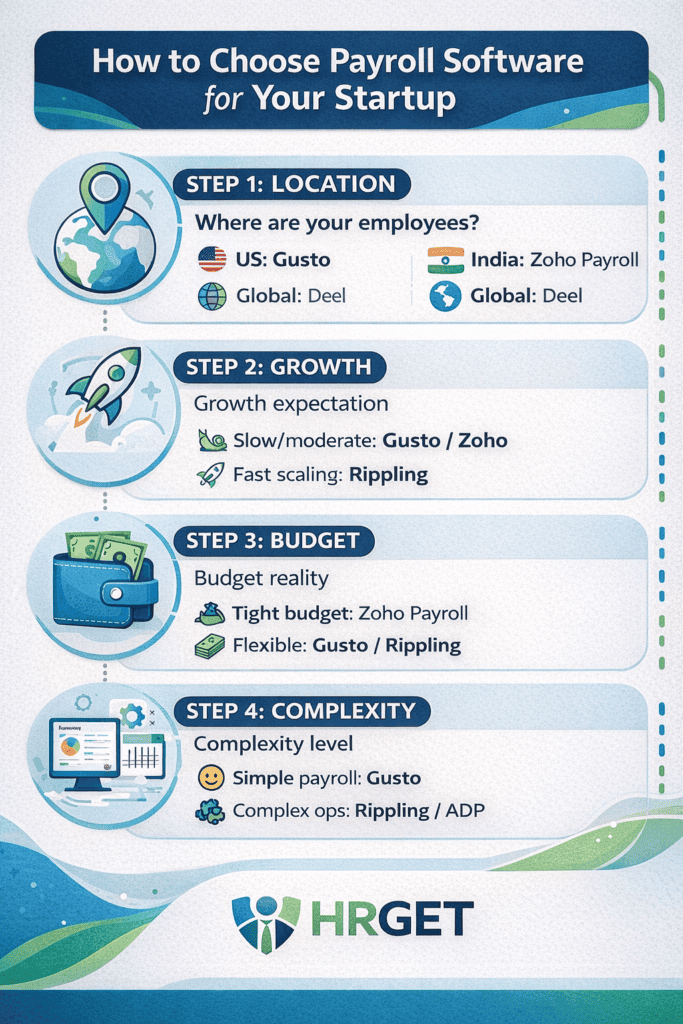
How to Choose: The 4-Question Decision Framework
Skip the feature matrices. Answer these four questions and your choice becomes obvious.
Question 1: Where are your employees?
Only in the US? → Gusto. India-based? → Zoho Payroll. Hiring globally or cross-border? → Deel. If the answer is “we’re planning to hire globally soon,” still start with Gusto for now — migrating later is easier than you think, and you’ll avoid paying for global infrastructure you don’t yet need.
Question 2: What’s your realistic growth trajectory over 18 months?
Staying under 30 employees? → Gusto or Zoho Payroll. Scaling to 50–100+ or crossing borders? → Rippling or Deel. If you’ve just closed a Series B and have aggressive hiring targets across multiple countries, jump straight to Rippling. The setup time pays back within 6 months at scale.
Question 3: What’s your budget reality?
Bootstrapped or pre-revenue? → Zoho Payroll (India) or Gusto Simple plan. Post-seed with runway? → Gusto Plus or Deel. Funded Series A+ with a people ops budget? → Rippling.
Question 4: Do you have a dedicated HR or ops person?
No → Gusto. It’s the only platform I’d confidently hand to a non-HR founder without a training session. Yes, with ops bandwidth → Rippling’s complexity becomes a feature, not a bug.
Smart Strategy: Start Lean, Scale Right
Here’s the playbook I’d run if I were advising a seed-stage startup with 8 employees today:
Phase 1: 0–15 Employees
Use Gusto Simple (US) or Zoho Payroll (India). Automate tax filing from Day 1 — this is non-negotiable. Set up employee self-service so your team can access payslips without emailing you. Connect it to QuickBooks or Xero. Budget: $80–$150/month. Time to first payroll run: under 2 hours.
Phase 2: 15–40 Employees
Add Gusto Plus for multi-state support if you’re hiring across US states. Layer in benefits administration — health, dental, 401(k). This is also the point where integrations matter: connect payroll to your ATS (Greenhouse, Lever) so onboarding data flows automatically. Budget: $200–$450/month depending on headcount.
Phase 3: 40+ Employees or Cross-Border
Evaluate Rippling if you want unified HR + IT + payroll under one roof, or Deel if global compliance is your primary pain point. At this stage, a proper implementation is worth the investment — you’re past the “set it and forget it” phase. Budget: $500–$1,500+/month, depending on headcount and modules.
Before you pick any payroll software, audit your contractor vs. employee classification. In 2026, the IRS and state agencies have significantly tightened enforcement — particularly for tech startups with large freelance/contractor bases. If you’re misclassifying employees as contractors (paying them regularly, setting their hours, directing their work), that liability follows you into any new payroll system. Fix the classification first; then choose the software. This isn’t a legal disclaimer — it’s the single most expensive mistake I’ve seen startups make in payroll setup.
Key Features You Cannot Ignore
Most founders evaluate payroll software on UI and price. Here’s what actually matters:
Automatic tax filing across all jurisdictions. This is table stakes — if your platform doesn’t handle federal, state, and local filings automatically, it’s not startup-ready in 2026. Gusto covers all 50 US states. Rippling covers 160+ countries. Check the list before you sign.
Employee self-service portal. Your team needs to access paystubs, W-2s, and benefits info without emailing HR (or you). Every platform on this list has it, but the quality varies significantly. Gusto’s is the most intuitive. Rippling’s is more powerful but takes more setup.
Contractor support and 1099 filing. Most early-stage startups pay a mix of W-2 employees and 1099 contractors. Make sure your platform handles both, and that 1099 filing is automated at year-end. Gusto’s contractor-only plan is $35/month base + $6/contractor — worth it if you’re contractor-heavy pre-hire.
Integration with your accounting stack. QuickBooks and Xero are the standard. If your payroll software doesn’t integrate directly, you’ll be manually reconciling entries — which is how errors compound over time.
Compliance alerts and audit trails. Particularly critical if you’re operating in states like California (AB5 enforcement, pay transparency laws) or if you have employees in the EU. Rippling and Deel are strongest here for multi-jurisdiction environments.
Pricing: What You’ll Actually Pay
Payroll software pricing is rarely as simple as the homepage suggests. Here’s the honest breakdown:
| Scenario | Tool | Estimated Monthly Cost (2026) |
|---|---|---|
| 5 US employees, contractors only | Gusto Simple | ~$65–$70/mo |
| 15 US employees, multi-state | Gusto Plus | ~$180–$220/mo |
| 10 global employees (3 countries) | Deel EOR | ~$1,800+/mo |
| 30 employees, US + HR + IT | Rippling (bundled) | $800–$1,200/mo (est.) |
| 20 India-based employees | Zoho Payroll | ~$30–$60/mo equivalent |
| 10 US employees, compliance-heavy | ADP RUN | ~$150–$250/mo |
A few things the pricing pages won’t tell you: Gusto charges extra for year-end W-2 and 1099 filings on some plans — confirm before you sign. Rippling’s quote-based model means your renewal pricing can shift as you add modules. Deel’s EOR fees are per employee, so a global team of 10 can quickly hit $6,000+/month. Budget for 10–15% above the baseline for add-ons and edge cases.
Budget payroll tools like Patriot ($17/month + $4/employee for basic) or Wave Payroll look attractive at first glance. The problem: they typically require you to handle state registrations, local tax filings, and year-end forms manually. For a founder already juggling product, fundraising, and hiring, that operational overhead is a real cost — it just doesn’t show up on the invoice. Calculate the full time cost before comparing price tags.
5 Common Payroll Software Mistakes Startups Make
1. Choosing based on price alone. The cheapest tool is rarely the cheapest option when you account for compliance risk, manual labour, and eventual migration. Pick for your stage, not for your monthly burn anxiety.
2. Ignoring multi-state complexity from Day 1. If you’re hiring remote employees — and in 2026, you almost certainly are — you need a platform that handles multi-state tax compliance from the start. Gusto’s research shows 60% of companies now have at least one employee more than 100 miles from HQ. Your payroll software needs to reflect that reality.
3. Delaying benefits integration. The moment you start offering health insurance or a 401(k), your payroll and benefits need to talk to each other. Platforms that treat these as separate systems create reconciliation headaches every month. Gusto and Rippling both handle this natively.
4. Treating contractor payments as an afterthought. Most early-stage startups run on a mix of employees and contractors. If your platform doesn’t handle both, you’re managing two separate systems — which means two sets of compliance requirements and two year-end filing processes.
5. Not planning for the migration. Every payroll system you’ll ever use has an exit cost — in time, data transfer effort, and potential payroll disruption. Before you sign, ask: “How do I get my data out?” Platforms with open APIs and clean data exports (Gusto does this well) are significantly easier to leave than those with proprietary data formats.
Frequently Asked Questions
Look — picking the best payroll software for your startup isn’t about finding the cheapest option or the one with the most features. It’s about matching the tool to your actual stage, geography, and operational capacity. Gusto for most US teams. Deel for global-first. Rippling when you’re scaling fast and need everything under one roof.
Get this decision right early, and payroll becomes infrastructure you never have to think about. Get it wrong, and you’ll be thinking about it constantly — just at the worst possible times.
If you found this useful, check out our guide on the best HRIS software for small businesses — because once your payroll foundation is solid, the next bottleneck is usually employee data and performance management.
Need Help Choosing HR Software for Your Team?
HRGet.com breaks down the tools, costs, and tradeoffs so you can make the right call — without the vendor spin.

David Schneider : HR Technology Consultant & Former Head of People Systems | Former SAP SuccessFactors Implementation Lead | HR Tech Consultant (Workday, ADP) | 17+ Years in People Systems
David Schneider has spent 17 years on the implementation side of HR technology — the part vendors never show you in the demo. As a former SAP SuccessFactors implementation lead and Head of People Systems, he has designed and deployed HRIS, payroll, ATS, and performance management systems for organisations ranging from 1,000 to 50,000 employees across Europe and North America. He has advised enterprise clients on Workday and ADP migrations, untangled integration disasters, and helped HR teams understand why they’re overpaying for tools they’re only using at 30% capacity. Based between Berlin and New York, David writes for HRGet.com to give buyers the honest, implementation-level perspective that analyst reports and vendor case studies never will.