Written by Victoria Hale — Employment Law Partner, Former Partner at Freshfields Bruckhaus Deringer | London & New York | 20+ years advising on workplace rights, GDPR compliance, and cross-border employment law.
If you’re working remotely, there’s a reasonable chance your employer is tracking more about you than you realise. Not just your login time — we’re talking about keystroke logs, periodic screenshots, screen recordings, idle time penalties, and in some cases, webcam checks. Remote work monitoring has become one of the fastest-growing areas of employment law dispute in 2026, and most employees are walking into it completely blind.
I’ve spent two decades advising employees and organisations on workplace rights across the US, UK, EU, and India. And I’ll tell you this plainly: the line between lawful monitoring and privacy violation is thinner than most employers admit — and far more consequential than most employees realise.
This guide will tell you exactly what your employer can track, where they cross a legal line, and what you can do about it — without torpedoing your career in the process.
What Remote Work Monitoring Actually Means
Remote work monitoring refers to any technology your employer uses to track, log, or measure your activity while you’re working from home. The tools vary considerably — from relatively benign productivity dashboards to genuinely invasive surveillance software that captures your screen every two minutes.
Common tools in use right now include time trackers like Hubstaff and Time Doctor, screen monitoring platforms, keystroke logging software, VPN activity logs, email and chat surveillance (on company systems), and in some organisations, webcam-based “presence” verification.
Here’s the key issue: it’s not monitoring itself that’s necessarily problematic. It’s the extent of monitoring, whether it’s proportionate to the job, and crucially — whether you were clearly told about it. That third part is where most employers get it wrong.
The Core Legal Principle
In almost every jurisdiction with relevant law — the US, UK, EU, and India — monitoring is treated as lawful when it is reasonable, necessary, and disclosed. Remove any one of those three legs and you’re in contested legal territory.
Why Employers Really Monitor Remote Workers
Let’s be honest about this. The public justifications — data security, regulatory compliance, protecting company assets — are real concerns for some organisations. But they aren’t the only driver, and in many cases they’re not the primary one.
The blunter truth is that remote work created a visibility gap that many managers never learned to close through leadership. When you could see someone at their desk, it felt like productivity. When you can’t? Some managers reach for surveillance software instead of building trust.
Data security is a legitimate concern in sectors like finance, healthcare, legal, and defence, where employees handle sensitive client data. A law firm with remote solicitors genuinely needs controls over how client documents are accessed. A call centre handling payment data has regulatory obligations around activity logging. These are real, defensible reasons.
Productivity anxiety, on the other hand, is a management failure dressed up as a business need. If a company is tracking keystrokes to verify that you’re “working hard enough,” that’s not a data security concern — it’s a trust deficit. And it reflects far more poorly on the organisation than on its employees.
Understanding why you’re being monitored matters, because it affects your legal position and your practical options. A company monitoring for genuine security compliance is in a very different conversation than one using activity scoring to manage performance on metrics that don’t correlate with actual output.
What the Law Actually Says: US, India, UK & Europe
There’s no single global law on remote work monitoring. What you’re entitled to depends significantly on where you’re employed. Here’s the practical picture across the regions most relevant to HRGet readers:
🇺🇸United States
Employers have broad rights to monitor company-owned devices. Federal law gives them considerable latitude, but disclosure matters — usually buried in employment policies. California offers stronger privacy protections than most states under the CCPA/CPRA framework. Key rule: company device, company’s data, employer’s rules.
🇮🇳India
The IT Act 2000 permits monitoring for security purposes. The Digital Personal Data Protection Act 2023 (DPDPA) introduced consent-based data handling requirements. Employers must now justify and disclose monitoring — vague policy language is becoming harder to rely on. Still evolving, but fast moving in employees’ favour.
🇬🇧United Kingdom
Post-Brexit, the UK retained GDPR principles through the UK GDPR and Data Protection Act 2018. ICO guidance is clear: monitoring must be necessary, proportionate, and transparent. The Employment Practices Code provides detailed expectations. Covert monitoring of employees is rarely justifiable under UK law.
🇪🇺European Union
GDPR applies with full force. EU employees have some of the strongest monitoring protections globally. Employers must demonstrate a lawful basis, minimise data collected, and notify employees clearly. Several member states — France, Germany, the Netherlands — have additional national-level restrictions. Violations can trigger fines up to 4% of global annual turnover.
One pattern holds across all regions: employers who monitor without clear disclosure are the ones who end up in employment tribunals, labour courts, or facing regulatory investigations. The law isn’t necessarily against monitoring — it’s against secret monitoring and monitoring that’s disproportionate to the stated purpose.
What Employers Can — and Can’t — Track
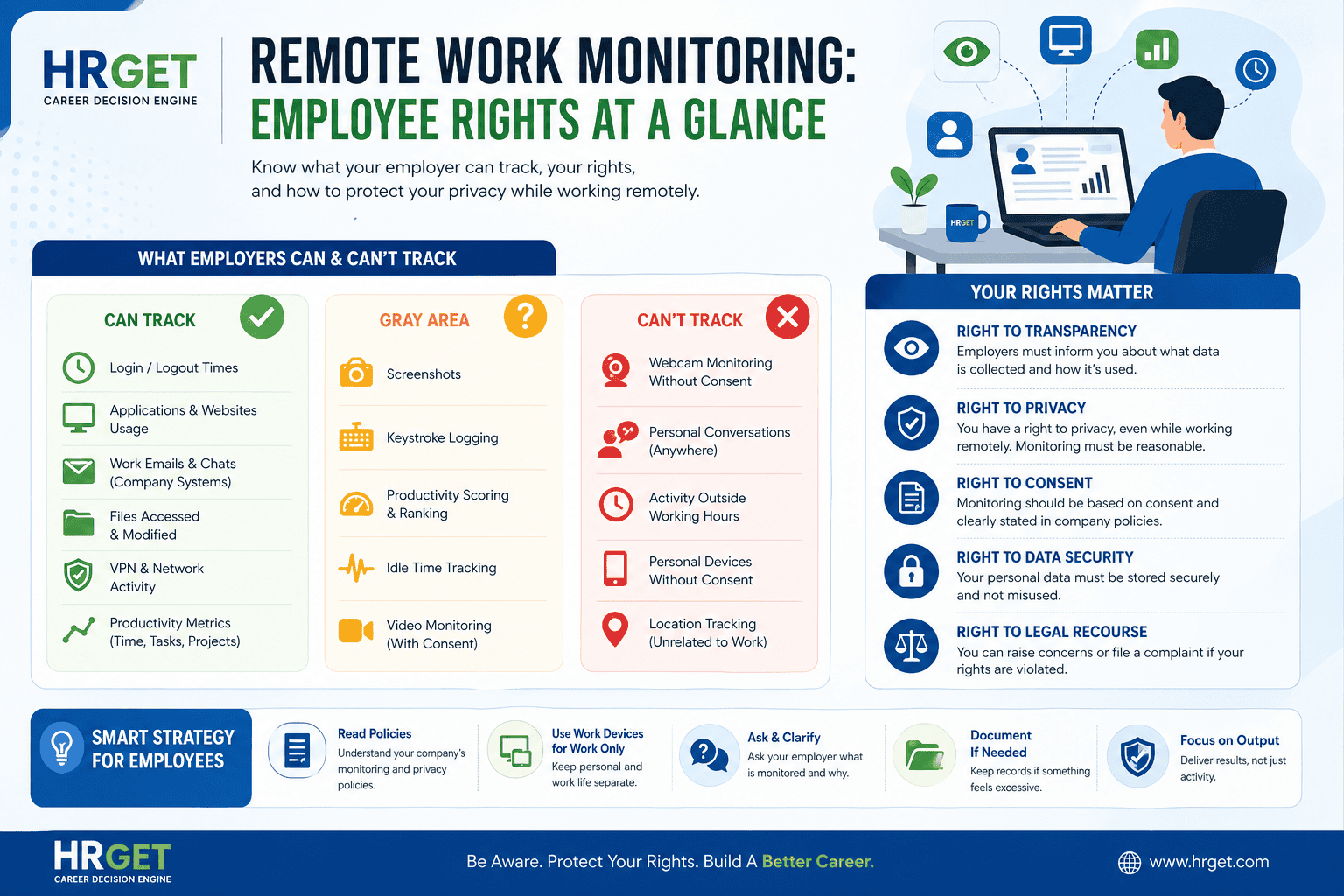
This is the section most articles get wrong by being vague. Let me be specific about the three-zone framework I use when advising clients:
| Monitoring Type | Legal Status | Key Condition |
|---|---|---|
| Login and logout times | ✅ Generally allowed | Standard, minimal intrusion |
| Work application usage (Slack, email, CRM) | ✅ Generally allowed | Company systems, disclosed in policy |
| Files accessed on company systems | ✅ Generally allowed | Legitimate security monitoring |
| VPN usage and network activity | ✅ Generally allowed | IT infrastructure management |
| Periodic screenshots (every 5–10 mins) | ⚠️ Grey area | Must be disclosed; proportionality questioned in EU/UK |
| Keystroke logging | ⚠️ Grey area | Needs clear justification; problematic in EU without explicit consent |
| Productivity / activity scoring | ⚠️ Grey area | Depends on how scores are used; linked to performance decisions = higher risk |
| Webcam surveillance without consent | ❌ Often illegal | Highly invasive; explicit consent required; frequently disproportionate |
| Monitoring outside working hours | ❌ Often illegal | Unjustifiable in almost every jurisdiction |
| Tracking personal devices without agreement | ❌ Often illegal | No lawful basis; constitutes unlawful access in most countries |
The grey area is where most disputes live. If your employer is taking screenshots every two minutes, running keystroke logs without disclosure, and tying it all to an “activity score” that feeds into your performance review — you’re not dealing with security monitoring. You’re dealing with surveillance, and the legal position is much weaker for the employer than they likely admit.
Real Scenario: When Monitoring Becomes a Constructive Dismissal Risk
Real Scenario
Arjun, 34, Senior Business Analyst — IT services firm, Pune
Arjun’s employer deployed monitoring software after the team went fully remote. Within weeks, it escalated: screenshots every two minutes, an “activity score” that flagged reading time as idle, and a weekly ranking that publicly displayed team members’ productivity percentages. Arjun was marked “low activity” on a day he spent three hours on a video call — which the software counted as idle.
His manager referenced the activity score in a mid-year review. Arjun escalated to HR. The firm had no written policy disclosing what the software tracked or how scores were calculated. Under India’s DPDPA 2023 framework, that absence of consent and disclosure created a defensible complaint. Arjun raised a formal written query, received a policy update — and negotiated a shift to output-based evaluation. He didn’t quit. He didn’t fight emotionally. He used the legal framework as leverage.
Lesson: Monitoring used in performance decisions without proper disclosure is not just uncomfortable — it can constitute an unlawful employment practice. Know this, and you hold more cards than you think.
Warning Signs You’re Being Over-Monitored
Some monitoring is so normalised that employees don’t realise it’s crossed a line. Here are the indicators worth taking seriously:
- Software installed without explanation. If IT pushed an application to your machine with no communication about what it does, ask — in writing.
- Screenshots or recordings at high frequency (every minute or two minutes). Proportionality is a legal standard. Two-minute intervals are hard to defend as “necessary.”
- Activity scores used in performance reviews. If your manager is citing your “keyboard activity” as part of your evaluation, the software has crossed from operational monitoring into performance management — a significantly higher legal bar to clear.
- Forced webcam during non-meeting hours. “Always-on” camera policies have been successfully challenged in German and Dutch courts as disproportionate. They’re worth pushback almost everywhere.
- Monitoring extending beyond contracted hours. If tracking software is active on evenings or weekends without your explicit agreement, that’s likely unlawful in the UK, EU, and increasingly under India’s DPDPA.
Before You React
Don’t raise concerns verbally in a team meeting. Don’t call it “creepy” on Slack. Document what you’ve noticed, gather specifics (timestamps, screenshots of policies or the lack thereof), and then ask a formal, professional question. Tone matters enormously in how this proceeds.
Smart Strategy: How to Protect Yourself Without Burning Bridges
Most people either panic and quit, or ignore the situation entirely and end up blindsided later. There’s a much smarter middle path — and it starts with information, not confrontation.
Step 1 — Read your contract and policies before anything else
Your employment contract should reference a monitoring or acceptable use policy. Your employee handbook or intranet almost certainly has one. Read both. Look specifically for: what is tracked, how long data is retained, who can access it, and whether it’s used in performance evaluation. In most countries, if an employer can’t point to a written policy that you had access to before monitoring started, they’re on weak legal ground.
Step 2 — Separate your devices completely
This is non-negotiable. Never use your company device for personal banking, personal email, personal social media, or any communication you’d want kept private. Never use your personal device for work tasks if a company MDM (mobile device management) profile might be installed. The crossover is where employees get blindsided — and where employers sometimes gain access to data they were never entitled to.
Step 3 — Ask a professional, specific question in writing
If you’re concerned about what’s being tracked, send a written query to IT or HR. Keep it factual and professional:
“Could you clarify what monitoring software is currently active on my work devices, what data is collected, and how it’s used? I’d also like to confirm where this is documented in our employment policies.”
This framing signals awareness — not rebellion. It also creates a paper trail if the situation escalates later.
Step 4 — Document anything that feels disproportionate
If you receive feedback or a performance flag that seems connected to monitoring data — especially if the data seems inaccurate (like being marked idle during a video call) — document it with dates, times, and specifics. You don’t need a solicitor for this. You just need a private record.
Step 5 — Know your escalation options
In the US, state labour boards handle privacy complaints. In the UK, the ICO (Information Commissioner’s Office) accepts complaints about data processing. In the EU, your national supervisory authority handles GDPR complaints. In India, DPDPA enforcement is still being established, but the framework creates grounds for formal HR complaints that carry genuine weight.
Pro Insight — Victoria Hale
In my experience, the employees who navigate monitoring disputes best are those who reframe the conversation from “this is unfair” to “this may not be compliant.” The first is an opinion. The second is a legal question that employers — and their legal teams — take far more seriously. Learn the language of the law. It changes the dynamic entirely.
Common Mistakes Employees Make — And What to Do Instead
Mistake 1: Assuming your remote setup is your private space. Your work laptop belongs to your employer. Everything on it — including files, browsing history on work networks, and emails sent through company systems — is company data. This applies whether you’re in an office or working from your kitchen table. Treat a work device like a shared filing cabinet, not a private journal.
Mistake 2: Ignoring what’s actually installed on your machine. On a Mac, go to System Preferences → Privacy → Full Disk Access or Screen Recording to see what has permissions. On Windows, check Task Manager → Startup Apps and installed programs. You might be surprised what’s running. Knowing is not paranoia — it’s due diligence.
Mistake 3: Fighting it emotionally rather than factually. Raising monitoring concerns in a heated team discussion, complaining on internal Slack, or telling your manager you find it “invasive” without any legal grounding rarely ends well. Facts, documentation, and specific legal references carry weight. Feelings, without those, do not.
Mistake 4: Using work devices for anything personal. Job searches, personal legal matters, medical queries, personal banking — none of this should happen on a company device. Ever. Particularly if you’re in a dispute with your employer, the last thing you want is for your job-searching activity to appear in a monitoring log.
Mistake 5: Assuming you have no leverage. Employees in GDPR jurisdictions have the right to submit a Subject Access Request (SAR) and see exactly what personal data their employer holds about them — including monitoring data. In the UK, employers have 30 days to respond. This is a remarkably underused tool, and it changes the conversation significantly when it’s deployed.
The Bigger Picture: Monitoring, Trust, and What It Signals About Your Employer
Remote work monitoring isn’t going away. The market for employee monitoring software grew substantially through 2023–2025, and 2026 data suggests adoption is still increasing — particularly among mid-size companies that lack the management infrastructure to lead distributed teams effectively.
But here’s what the research actually shows: high levels of surveillance correlate with lower performance, higher attrition, and worse employee mental health outcomes. The organisations winning top talent in 2026 are overwhelmingly those with output-based evaluation, flexible structures, and low surveillance cultures. The ones losing their best people are those substituting keystroke logs for actual management.
So if the monitoring at your current employer feels excessive — not just uncomfortable, but genuinely excessive — that’s useful data. It’s a signal about management culture, about how trust is distributed in the organisation, and about whether the environment is one where you can do your best work long-term.
That doesn’t mean quit immediately. It means be strategic. Use your rights, document what matters, and make decisions based on facts rather than frustration. Your next job negotiation is always easier when you leave on your own terms.
For more on your rights when an employment relationship turns adversarial, see our guide on wrongful termination rights — what to do when your employer crosses a legal line.
Frequently Asked Questions: Remote Work Monitoring & Employee Rights
Can my employer monitor me without telling me?
In most jurisdictions — no, not legally. UK GDPR, EU GDPR, and India’s DPDPA all require that employees be informed about monitoring before it begins. In the US, notification is less strictly mandated at the federal level, but is often buried in employment contracts or acceptable use policies. If you’ve never seen a monitoring policy, ask for one — in writing.
Can my employer track activity on my personal laptop?
Only if you have explicitly agreed to it — typically by installing company software or signing a BYOD (Bring Your Own Device) agreement. Without that, monitoring your personal device is unlawful in the UK, EU, and most US states. If your employer asks you to install software on your personal machine, get written confirmation of exactly what it tracks before agreeing.
Is screen recording legal for remote employees?
Yes, when it’s disclosed in policy and limited to work-related activity. Continuous screen recording without your knowledge is significantly harder to justify legally and has been challenged successfully in EU and UK employment tribunals. Periodic screenshots (every 5–10 minutes) are more commonly defended; screenshots every 60–120 seconds face proportionality challenges in Europe.
Can I refuse to be monitored by my employer?
You can raise objections, but outright refusal of monitoring on company devices during work hours is difficult to sustain as an employment position. The more productive approach is to ask for clarity on scope, challenge disproportionate elements (like webcam monitoring or after-hours tracking), and negotiate alternatives — particularly if you’re in a senior or output-measurable role.
Is webcam monitoring of remote employees legal?
Rarely, as a continuous or background practice. Scheduled video calls are a different matter. But always-on webcam software, or software that takes periodic webcam photos to verify your “presence,” is considered disproportionate and has been found unlawful in several EU member states. In the UK, ICO guidance makes clear that this level of intrusion needs exceptional justification.
What is a Subject Access Request and how do I use it?
In the UK and EU, a Subject Access Request (SAR) is your legal right to request all personal data your employer holds about you — including monitoring data, activity logs, and any notes generated by surveillance software. Submit it in writing to your HR or data protection contact. Employers must respond within 30 days (UK) or one month (EU). It’s one of the most underused tools in employment disputes — and one of the most effective.
Do all remote employers monitor their staff?
No. Many high-performing companies — particularly in tech, professional services, and creative industries — operate on output-based evaluation with minimal or no active monitoring. Monitoring intensity tends to correlate with management culture more than job function. If your employer uses heavy surveillance, that’s a management choice, not an industry standard.
The Bottom Line on Remote Work Monitoring
Remote work monitoring is legal — but only within limits. The three-word rule to remember: reasonable, necessary, and disclosed. When your employer’s monitoring fails any one of those tests, you have grounds to push back. Not emotionally, not hastily — but strategically, with documentation and an understanding of the law on your side.
Know your rights. Protect your devices. And if the monitoring culture at your company consistently signals a lack of trust — that’s information about whether this is the right place for your next five years of growth.

Victoria Hale | Former Partner, Freshfields Bruckhaus Deringer | Employment Law Specialist | 20+ Years Advising Multinationals & Executives
Author: Victoria Hale spent over two decades as an Employment Law Partner at Freshfields Bruckhaus Deringer — one of the world’s most prestigious Magic Circle law firms — advising multinational corporations and senior executives on some of the most complex employment disputes in the US and Europe. Her practice covered wrongful termination litigation, executive exits, non-compete enforcement, FLSA compliance, and cross-border workforce restructuring under EU labour law. Now based between London and New York, Victoria writes for HRGet.com to close the gap between legal theory and how employment law actually plays out in the real world — for employees who need to know their rights before it’s too late.