
If you’re hiring even 5–10 people a year, here’s the uncomfortable truth: your hiring process is probably already broken — you just haven’t felt the full cost of it yet.
Resumes disappearing into email inboxes. Strong candidates going silent because you took four days to respond. Offers extended to the wrong person because there was no structured way to compare finalists. I’ve seen this exact pattern play out at dozens of small companies, and it almost always traces back to one thing: no system.
That’s where a best applicant tracking system for small companies stops being an HR luxury and becomes a genuine business tool. But here’s what most ATS comparison articles won’t tell you: half the tools they recommend are built for enterprises with 500-person HR teams. You don’t need that. You need something lean, fast, and actually usable.
This guide gives you the real picture — which tools work, which are overkill, and exactly how to choose without wasting money or time.
What an ATS Actually Does (Beyond the Marketing Jargon)
Let’s cut through the vendor-speak. An Applicant Tracking System is software that centralizes your entire hiring pipeline — from the moment someone clicks “Apply” to the moment you send an offer letter.
Here’s what that means practically:
Every application lands in one dashboard instead of three different email threads. You can see at a glance who’s at what stage — Applied, Phone Screen, Interview, Final Round, Offer. Your team can leave structured feedback without playing phone tag. And candidates get timely, professional communication instead of radio silence.
The real benefit isn’t the software. It’s the discipline it forces on your process. A good ATS makes you define what “a great hire” looks like before you start interviewing — and that changes everything.
Look, the tools have also gotten significantly smarter in 2026. Most mid-tier ATS platforms now include AI-assisted resume parsing, automated interview scheduling, and even basic candidate scoring. Things that used to require a dedicated recruiter are now handled in the background.
But none of that matters if the tool is too complicated for your office manager to use on a Tuesday afternoon. Ease of use is table stakes.
Why Small Companies Need an ATS in 2026
The hiring market in 2026 is genuinely unforgiving for small employers who move slowly. Candidates — especially in tech, marketing, and operations roles — are applying to 20–40 positions simultaneously. The best ones are off the market in 7–12 days, sometimes less.
Here’s what happens without a system: a strong candidate applies on Monday, your hiring manager doesn’t see the email until Wednesday, a follow-up gets missed, and by Friday that person has accepted an offer from a company that had their act together.
Beyond speed, there’s the employer brand angle. Small companies are already fighting an uphill battle against recognized names. A disorganized hiring process — delayed responses, no confirmation emails, unclear next steps — signals to candidates that the company itself might be disorganized. That perception sticks, and it spreads on Glassdoor and LinkedIn.
A good ATS for small business fixes this without requiring you to hire a full-time recruiter. Automated confirmation emails, structured interview stages, and a professional careers page all signal: this is a company that has its act together. For a 20-person startup competing with a 200-person company for the same candidate, that matters.
What to Look for in ATS Software for Small Business
Most “best ATS” lists recommend whatever pays the highest affiliate commission. Here’s what you should actually evaluate.
Ease of use comes first — no exceptions. If your hiring manager has to watch a 45-minute tutorial before posting a job, the tool will collect dust. The best ATS for small teams should be usable within an hour of signup.
Automation without complexity. You want auto-confirmation emails, basic interview scheduling, and resume parsing. You don’t need predictive analytics dashboards or custom AI models. Yet.
A clean careers page builder. Candidates will Google your company and click “Careers.” If that page looks like it was built in 2009, you’ve already lost credibility. Most decent ATS tools include a hosted careers page. Use it.
Team collaboration features. Structured scorecards and shared feedback between interviewers prevent the classic “I liked them but I’m not sure” post-interview confusion. You need comments and ratings built in.
Pricing that makes sense for low volume. Avoid any tool that forces you into a 12-month contract with a per-seat fee before you’ve even run a full hiring cycle. Start with monthly billing. Commit later.
Best ATS for Small Companies — Ranked and Reviewed
1. Breezy HR — Best Overall for Small Teams
Breezy HR is the one I’d recommend to 80% of small companies without hesitation. The drag-and-drop pipeline view is genuinely intuitive — most hiring managers are productive within a day. Automation is solid: auto-emails, interview scheduling, resume parsing all work out of the box.
The free plan is legitimately useful for companies hiring under 10 people a year. Paid plans start around $157/month and scale gradually, which is rare in this category.
The honest limitation: it’s not built for complex, multi-stage enterprise hiring. But for a 15–100 person company making 5–30 hires a year? It hits the sweet spot.
Best for: Startups and small businesses that need to get organized fast without a steep learning curve.
2. Workable — Best for Startups on a Hiring Spree
Workable is a step up in power. The sourcing tools are genuinely impressive — it can surface passive candidates from LinkedIn and job boards automatically. AI-assisted candidate matching has improved considerably in 2026 and is now actually useful rather than a gimmick.
Pricing sits at the premium end ($299+/month for most useful tiers), which makes it overkill if you’re hiring fewer than 15–20 people a year. But if you’re planning aggressive growth and need to run multiple job searches simultaneously, it earns its cost.
Best for: Funded startups scaling from 20 to 100 people within 12–18 months.
3. Zoho Recruit — Best Budget-Friendly Option
If budget is the primary constraint, Zoho Recruit delivers real functionality at a fraction of the cost. The free plan supports one active job, and paid plans start around $25/user/month — the most affordable serious option in this space.
The catch: the UI hasn’t aged gracefully. It works, but it’s not slick. If you’re already using other Zoho products (CRM, Books, People), the integration value makes it a clear choice. If you’re not in the Zoho ecosystem, the interface friction might cost you adoption.
Best for: Small businesses on a tight budget or those already using Zoho tools.
4. Freshteam — Best for Combining ATS and HR in One Tool
Freshteam is interesting because it combines applicant tracking with onboarding and basic HR management. If you’re at the stage where you need to track new hire documents, leave balances, and org charts alongside your hiring pipeline, it saves you from stitching together two separate tools.
Pricing is mid-range, and the UI is genuinely clean. The hiring side is slightly less powerful than Breezy or Workable, but the HR functionality offsets that for many small companies.
Best for: Companies that want ATS + lightweight HR in one platform without paying for two subscriptions.
5. Greenhouse — Best for Companies Obsessed With Hiring Quality
Greenhouse is the tool of choice for companies that treat structured hiring as a core competency. The scorecards, interview kits, and reporting tools are among the best in the category. If you want to run a rigorous, bias-reduced hiring process and actually measure quality-of-hire over time, this is it.
It’s also expensive and complex. Implementation takes time. For a 15-person company making 8 hires a year, it’s almost certainly more than you need.
Best for: Companies where every hire is high-stakes and hiring quality is a board-level conversation.
6. Lever — Best for Continuous and Relationship-Based Hiring
Lever takes a CRM-style approach to recruiting — it’s built around nurturing candidate relationships over time, not just processing applicants. If you’re building a talent pipeline (reaching out to people before you have open roles), Lever handles this better than most.
It’s priced accordingly and adds real complexity. Worth it if continuous hiring is part of your growth model. Not worth it if you hire in sporadic bursts.
Best for: Companies in competitive talent markets doing proactive, relationship-first recruiting.
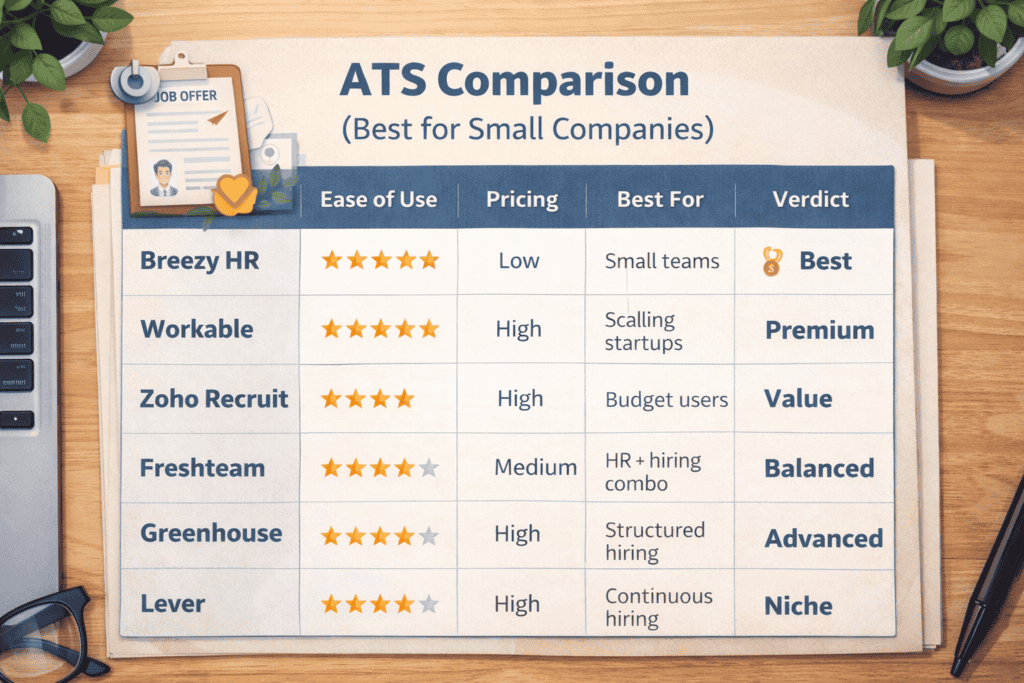
Quick Comparison: ATS Tools Side by Side
| ATS Tool | Ease of Use | Pricing Range | Best For | Verdict |
|---|---|---|---|---|
| Breezy HR | ⭐⭐⭐⭐⭐ | Free – $157+/mo | Small teams, startups | 🥇 Best overall |
| Workable | ⭐⭐⭐⭐ | $299+/mo | Scaling startups | Premium pick |
| Zoho Recruit | ⭐⭐⭐ | Free – $25+/user/mo | Budget-conscious | Best value |
| Freshteam | ⭐⭐⭐⭐ | $1+/employee/mo | HR + hiring combo | Balanced |
| Greenhouse | ⭐⭐⭐ | Custom (high) | Structured hiring | Advanced |
| Lever | ⭐⭐⭐⭐ | Custom (high) | Relationship hiring | Niche |
Real Scenario: What Hiring Looks Like With vs. Without ATS
Picture this: you’re a 22-person SaaS company. You need to hire 4 engineers and a growth marketer within 90 days. Your CTO is doing first-round interviews, your CEO is closing candidates, and your office manager is coordinating scheduling.
Without ATS: Applications are coming into three different email inboxes. The CTO marks candidates “interesting” with a Gmail star. Interview notes live in a shared Google Doc that’s 40% outdated. Two candidates got forgotten entirely — one of them was probably your best option. Scheduling takes 3 email threads per candidate. By day 30, you’ve interviewed 11 people and haven’t made a single offer.
With Breezy HR (or similar): Every application lands in one dashboard. The CTO leaves a structured scorecard after each call. The office manager sends interview invites with one click using a calendar integration. Auto-emails go out at every stage so candidates never feel ghosted. By day 30, you’ve interviewed 11 people, ranked them clearly, and extended two offers. Both candidates felt like the process was professional and organized.
That’s not a hypothetical. That’s what I’ve watched play out, almost exactly, more times than I can count.
Smart Strategy: How to Choose and Roll Out Your First ATS
Here’s the move most founders get wrong: they spend three weeks evaluating tools instead of just picking one and starting.
Step 1: Match the tool to your current reality, not your future plans. If you’re hiring 5–15 people this year, start with Breezy HR. Don’t buy Greenhouse because “we’ll need it eventually.” You can migrate later. Hiring 20+ per year? Go straight to Workable.
Step 2: Set up your pipeline stages before you post a single job. Define exactly what your stages are: Application Received → Recruiter Screen → Technical Interview → Final Round → Offer. Do this first. An ATS organizes your process — it doesn’t create it.
Step 3: Build your email templates on day one. Write a confirmation email, a rejection email, and an interview invite. These three templates will save you 2–3 hours per week immediately. Most ATS tools let you create these in 20 minutes.
Step 4: Train the decision-makers, not just the coordinator. Your hiring managers need to know how to leave a scorecard. That’s it. The ATS admin stuff lives with one person. The feedback function needs to be used by everyone who interviews.
Step 5: Upgrade when you have evidence you’ve outgrown the tool. Not when a salesperson tells you to. When you’re hitting real limits — can’t support multiple open roles simultaneously, missing analytics you need, automation isn’t sophisticated enough — then move up.
Common Mistakes Small Companies Make With ATS Tools
Buying enterprise software too early. Greenhouse and Lever are genuinely excellent tools. They’re also built for companies with dedicated HR teams and recruiting budgets above $200K/year. Buying them at 20 employees means you’ll use 15% of the features and pay 100% of the price.
Treating the ATS as the strategy. Software organizes a process. It doesn’t create one. If your interview process is “have a chat and see how we feel,” an ATS will just make that chaos faster and more expensive. Define what “good” looks like before you automate anything.
Ignoring candidate experience. The ATS is only one side of the equation. If your application form takes 25 minutes to fill out, candidates are dropping before they even get in the system. Keep the application lean — name, resume, two to three qualifying questions. That’s it for the first step.
Over-automating too early. There’s a real risk of making your hiring feel robotic. If every touchpoint is an auto-email, you’ll lose the human connection that gets candidates excited about joining a small company. Use automation for logistics. Use humans for relationship-building.
Skipping the rejection process. I’ll be honest — most small companies are terrible at this. A quick, personalized rejection email takes 30 seconds to send via ATS template. Not doing it is a brand damage decision, not just an HR oversight. Rejected candidates talk.
FAQs
What is the best ATS for small companies in 2026? For most small companies, Breezy HR is the strongest all-around choice — it’s easy to use, reasonably priced, and covers all the essentials without overwhelming a lean team. If budget is tight, Zoho Recruit is the best low-cost alternative. If you’re scaling aggressively, look at Workable.
Is ATS software worth it for a startup with fewer than 20 employees? Yes, if you’re making more than 4–5 hires per year. The time saved on coordination alone typically justifies the cost within the first month. More importantly, it prevents the candidate experience failures that cost you good people.
How much does a small business ATS cost per month? Entry-level options like Zoho Recruit start around $25/user/month. Mid-tier tools like Breezy HR run $100–$200/month for small teams. Premium platforms like Workable or Greenhouse are typically $300–$600+/month and often require annual contracts.
Can an ATS help me rank higher on job boards like Indeed or LinkedIn? Indirectly, yes. Most ATS platforms include one-click job posting to multiple boards. Consolidated posting and faster response times improve your job board ratings and candidate satisfaction scores over time.
What’s the difference between an ATS and a CRM for recruiting? An ATS manages active candidates applying to open roles. A recruiting CRM manages passive candidates and long-term talent pipelines. Lever and Greenhouse blur this line. For most small companies, an ATS is enough — you only need CRM functionality when proactive sourcing becomes a regular part of your process.
How long does it take to set up an ATS for a small team? With a tool like Breezy HR or Freshteam, you can have a working setup — pipeline stages, email templates, careers page, first job posted — in under 3 hours. Don’t let “setup time” be the excuse that keeps you stuck in email chaos for another six months.
When should I switch ATS platforms? When you’re consistently frustrated by missing features, not when a sales rep pitches you. Specific triggers: you’re hiring more than 20 people per year, you need sophisticated analytics, or your current tool can’t support simultaneous multi-department searches without breaking.
The Real Decision You’re Making
Choosing the best applicant tracking system for small companies isn’t actually about picking the tool with the most features. It’s about deciding whether you’re serious about hiring as a function — or whether you’re going to keep winging it until a missed hire hurts the business badly enough to force a change.
Most founders make that change reactively. The ones who move fastest make it proactively.
If you’re just starting out: go with Breezy HR, set it up this week, and start your next job search through it. If you’re scaling aggressively: Workable is worth the premium. If every dollar counts: Zoho Recruit gets the job done.
Pick one. Start. Refine as you go. The worst ATS is the one you haven’t implemented yet.

Michael Reeves | Former Senior Counsel, Littler Mendelson | Severance & Restructuring Specialist | 18+ Years in Employment Law
Author bio: Michael Reeves spent nearly two decades as Senior Counsel at Littler Mendelson — one of the world’s largest employment law firms — advising on mass layoffs, corporate restructurings, and severance negotiations for Fortune 500 companies across the US and Europe. He has worked both sides of the table: structuring cost-efficient separation packages for employers and, more recently, helping employees understand exactly where their leverage lies. Based between Chicago and London, Michael writes for HRGet.com to demystify the legal and financial dimensions of layoffs — so employees stop leaving money on the table.
Pingback: Ultimate Guide to ATS for SMEs | Rent a Recruiter