Most founders don’t think about payroll software until something breaks — a tax filing is late, an employee’s salary hits their account two days off, or someone quits citing “it’s just unprofessional.” That’s when the panic Google search happens.
I’ve watched this exact pattern play out across dozens of early-stage teams. If you’re looking for the best payroll software for startups before you’re in crisis mode, you’re already doing better than most. This guide gives you a straight answer: which tools actually work, what they cost beyond the pricing page, and how to choose without overbuilding your stack on day one.
No sponsored rankings. No generic top-10 lists. Let’s get into it.
What Startups Actually Need From Payroll Software
Here’s the thing — most payroll software is built for someone else. Enterprise HR suites are designed for 500-person companies with dedicated HR teams. Freelance invoicing tools don’t handle employment compliance at all. You’re caught in the middle.
What a startup actually needs is simpler than vendors want you to believe:
Pay employees accurately and on time. Handle tax calculations and filings automatically. Stay compliant with labor laws without hiring a dedicated HR person to manage it.
That’s it. Everything else — org charts, workforce analytics, AI scheduling — is noise until you’re past 100 employees, and even then, you can add it later.
I’ll be honest: the mistake I see most often isn’t choosing the wrong software. It’s choosing payroll software too late or treating it as a back-office admin task. Payroll is a legal obligation. Get it wrong and you’re looking at IRS penalties in the US or notices from the PF department in India — neither of which is how you want to spend a Tuesday.
The right payroll software for a startup removes that risk entirely, so you can focus on actually building the company.
The Four Types of Payroll Software — And Which to Skip
Before you compare specific tools, it helps to understand what category of software you’re even shopping for. There are four, and one of them you should almost certainly skip.
Basic Payroll Tools handle salary calculations and tax withholding — nothing more. Think of these as payroll calculators with a pay stub generator attached. They’re cheap, sometimes under $20/month, and fine if you have one or two employees with simple pay structures. Beyond that, they become a liability.
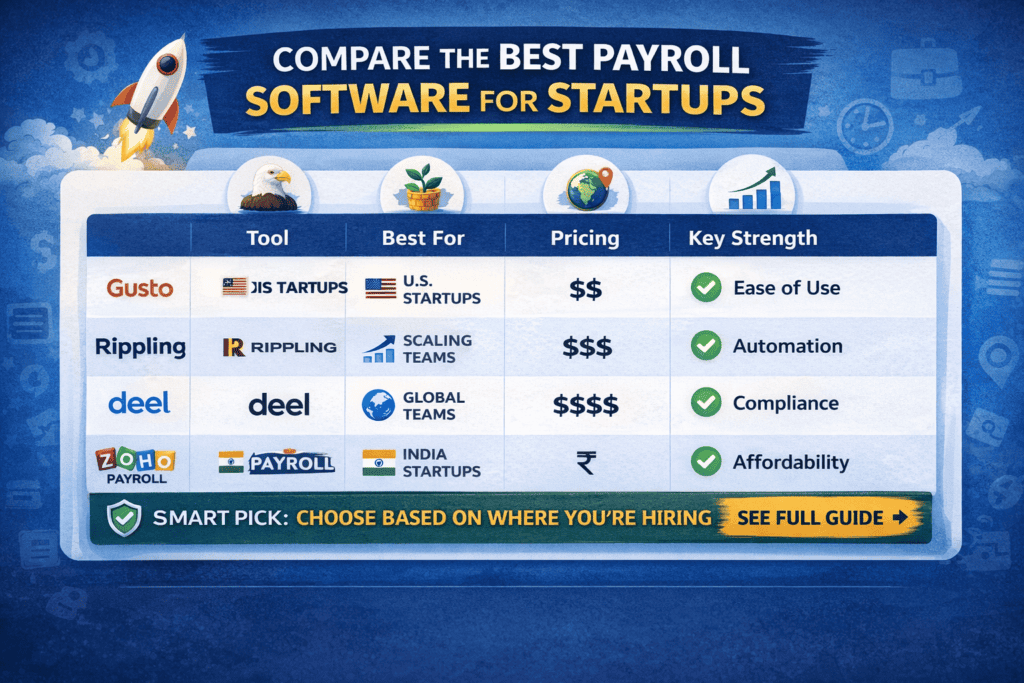
Payroll + HR Platforms (HRIS) are where most startups in the 5–100 employee range belong. These combine payroll processing with onboarding workflows, leave tracking, and benefits administration. You get the compliance coverage of a proper payroll tool with enough HR infrastructure to avoid chaos as you grow. Gusto, Rippling, and Zoho Payroll all sit in this category.
Global Payroll Platforms are built for teams spread across multiple countries. They handle the complexity of paying a contractor in Brazil, a full-time employee in Germany, and a remote hire in the Philippines — all in one place, with local compliance built in. Deel is the clearest example. These cost more, but if you’re hiring globally, the alternative is hiring local employment lawyers in each country. That costs far more.
Full HCM Suites — think SAP SuccessFactors, Workday, Oracle HCM — are enterprise systems that do everything, including things you don’t need and won’t use for years. The implementation alone can take months. Skip these entirely until you’re north of 200 employees and have a dedicated HR ops team.
Best Payroll Software for Startups in 2026: Honest Picks
These aren’t ranked by affiliate commission. They’re ranked by fit for different startup types.
Gusto — Best for US Startups Under 50 Employees
Gusto is, genuinely, the closest thing to “set it and forget it” payroll for US-based teams. It handles federal and state tax filings automatically, supports W-2 employees and 1099 contractors in the same dashboard, and has a clean enough UI that a non-HR founder can run payroll in under 15 minutes.
Where Gusto earns its reputation is in benefits integration. You can offer health insurance, 401(k), and commuter benefits directly through the platform — which matters enormously for hiring competitive talent in the US without a full HR team.
The honest downside: pricing scales quickly. At the Simple plan (~$40 base + $6/employee/month), a 15-person team runs you about $130/month. Move to the Plus plan for time tracking and PTO management and you’re closer to $200+. Still reasonable, but worth knowing.
Best for: US-based startups, 1–50 employees, no global hiring complexity.
Rippling — Best for Fast-Scaling Startups
Rippling is the most powerful system on this list, and also the one that rewards you for growing into it. It combines payroll, HR, and IT device management in a single platform — meaning when you onboard a new hire, you can set up their laptop, software access, and first paycheck all from one place.
The automation capabilities are genuinely impressive. You can build workflows that trigger payroll changes when someone gets promoted, automatically enroll employees in benefits when they cross a tenure threshold, or flag compliance issues before they become problems.
The catch? It’s expensive and not startup-simple. Rippling is priced on custom quotes, but most teams in the 20–50 person range report spending $150–300/month. There’s also a learning curve for the first few weeks. You’ll want someone who enjoys figuring out software to set it up properly.
Best for: Startups with 20+ employees, technical founders, aggressive hiring plans.
Deel — Best for Remote and Global Teams
Deel solves a specific and painful problem: legally employing people in countries where you have no legal entity. Without a tool like Deel, hiring a full-time employee in the UK as a US company means setting up a UK subsidiary, dealing with HMRC payroll registration, and navigating employment law — or misclassifying them as a contractor and hoping no one notices. Both options are bad.
Deel acts as the Employer of Record (EOR) in 150+ countries, meaning they handle local compliance while you manage the work relationship. For contractors, it’s even simpler — you pay through Deel, they handle local currency, and you get one clean invoice.
Pricing runs from $49/month for contractor management to $599+/month per employee for full EOR services. That sounds steep, but compare it to the cost of a local employment lawyer plus company registration fees in a new country — and Deel wins by a mile.
Best for: Remote-first startups, international hiring, teams with a mix of contractors and employees.
Zoho Payroll — Best for India-Based Startups
If your team is based in India, Zoho Payroll is the most practical option available. It’s built specifically for Indian statutory compliance: PF (Provident Fund), ESI (Employee State Insurance), PT (Professional Tax), and TDS deductions are all automated and filed correctly. That alone saves significant manual work — and the headache of getting a statutory notice from the EPFO.
Pricing is genuinely startup-friendly, with plans starting around ₹40–50 per employee per month for small teams. If you’re already in the Zoho ecosystem — using Zoho Books, Zoho CRM, or Zoho People — the integration is seamless.
The limitation is clear: it’s India-first and only. The moment you hire outside India, you’ll need a different tool alongside it.
Best for: India-based startups, teams under 100 employees, Zoho ecosystem users.
ADP Run — Best for Compliance-Heavy Industries
ADP has been around long enough that “reliable” is baked into its DNA. If your startup is in healthcare, financial services, or any sector where a payroll audit would be catastrophic, ADP’s compliance infrastructure and reporting are hard to beat.
That said, ADP isn’t built with founders in mind. The UI is dated compared to Gusto or Rippling, onboarding takes longer, and pricing is on the higher end without transparency. Most lean startups will find it overkill.
Best for: Regulated industries, founders who prioritize compliance infrastructure over user experience.
Real Startup Scenarios: Here’s What to Choose
Let me make this concrete.
Scenario: You’re a 6-person SaaS startup in Austin, TX. Everyone’s a W-2 employee. You have no HR person. → Use Gusto. Simple setup, handles Texas state filings, and your employees can access their pay stubs and W-2s without bothering you.
Scenario: You’re a 12-person product studio in Bangalore. All full-time employees. Mix of metro and Tier 2 city hires. → Use Zoho Payroll. PF and ESI compliance handled, cost-effective, integrates with Zoho Books if you’re using it for accounting.
Scenario: You’re a remote-first startup with 8 people across India, Portugal, and Canada. Mix of employees and contractors. → Use Deel for international hires and contractors, Zoho Payroll for your India employees. Yes, two tools — it’s the cleanest split.
Scenario: You’ve just raised a Series A. 40 employees today, planning to hit 120 within 18 months. → Move to Rippling now, before the complexity forces a painful mid-growth migration. The upfront learning curve beats rebuilding your entire HR stack at 80 people.
Features That Actually Matter (And the Ones That Don’t)
Look, every payroll vendor will show you a 47-item feature checklist. Most of it doesn’t matter for startups. Here’s what actually does.
Automatic tax filing is non-negotiable. If the tool doesn’t file federal, state, and local taxes on your behalf — reject it immediately. Manual tax filing is where errors happen, and errors mean penalties.
Employee self-service portals save you an embarrassing amount of time. When employees can download their own pay stubs, update their bank details, and view their leave balance without emailing you — you get hours back each week.
Contractor + employee support in one platform matters because most startups use both. Switching between two systems to run payroll is a recipe for missed payments.
Accounting integrations with QuickBooks, Xero, or Zoho Books mean your payroll data flows directly into your books without manual reconciliation. This matters more than you’d think at year-end.
What you don’t need right now: AI workforce planning tools, advanced org chart builders, complex performance management modules, or predictive attrition scoring. These are legitimate enterprise features. They’re not for you yet.
Payroll Pricing: What You’ll Actually Pay
Marketing pages love to show you the per-employee cost and hide the base fee. Here’s what a 10-person team realistically pays per month in 2026:
| Tool | Base Fee | Per Employee | ~10-Person Monthly Cost |
|---|---|---|---|
| Gusto (Simple) | $40 | $6 | ~$100 |
| Gusto (Plus) | $80 | $12 | ~$200 |
| Rippling | Custom | ~$8–15 | ~$160–230 |
| Deel (Contractors) | $49 | $49/contractor | ~$540 (10 contractors) |
| Deel (EOR Employees) | — | ~$599/employee | $5,990 (10 employees) |
| Zoho Payroll (India) | Low base | ₹40–50/employee | ₹500–800 (~$6–10) |
| ADP Run | Custom | High | $200–400+ |
A few things worth noting: Deel’s EOR pricing looks alarming until you price out the alternative — registering a legal entity in a foreign country, plus ongoing compliance costs, typically runs $15,000–$50,000+ per country. At that scale, $599/employee/month is a bargain.
Zoho Payroll is genuinely the most affordable compliant payroll tool available for Indian teams, and the gap versus the others is significant.
Common Mistakes Founders Make With Payroll
I’ve seen these play out more times than I’d like to admit.
Waiting until something breaks. Founders treat payroll software as an upgrade, not a foundation. Then they have 15 employees, a manually managed spreadsheet, and an accountant who charges $3,000 per quarter to reconcile the mess. Start right.
Misclassifying employees as contractors. This is the most expensive payroll mistake a startup can make. In the US, the IRS applies a multi-factor test for classification. Getting it wrong means back-paying employment taxes with interest and penalties. In India, sustained contractor relationships without a proper vendor agreement trigger similar scrutiny. If someone works for you full-time and exclusively — they’re almost certainly an employee, legally.
Choosing software that doesn’t scale. Switching payroll systems when you have 60 employees is painful: data migration, retraining, disrupted pay cycles, and employee distrust. Make a slightly longer-term decision upfront, even if you’re only 10 people today.
Ignoring state or local compliance. US founders often nail federal tax compliance and forget state-specific requirements. A startup in California faces different payroll obligations than one in Texas — SUI rates, SDI contributions, and local minimum wages all vary. Gusto handles this automatically. Spreadsheets don’t.
Smart Strategy: How to Scale Your Payroll Stack
Here’s a clean three-phase approach that avoids both underpaying and overbuilding.
Phase 1: Seed to Series A (1–20 employees)
If you’re US-based, start with Gusto. If you’re India-based, start with Zoho Payroll. If you’re hiring globally from day one, start with Deel. Don’t layer on complexity before you need it. Your goal is clean compliance and on-time pay — nothing more.
Phase 2: Series A to Series B (20–80 employees)
This is when HR complexity starts to compound: multiple departments, manager approvals, PTO policies, performance cycles. If you started on Gusto, evaluate whether Rippling’s automation would save meaningful time. If you’re on Zoho Payroll and starting to hire internationally, Deel becomes a serious consideration alongside it.
Phase 3: Series B and beyond (80+ employees)
You now need HR ops infrastructure, not just payroll software. Rippling becomes genuinely valuable here because it unifies payroll, HR, and IT into one system. You might also start evaluating whether a dedicated HR ops hire makes more sense than adding more software layers.
The pro tip that most people miss: the best time to migrate payroll systems is during a hiring pause, not in the middle of a growth sprint. Plan your stack upgrade for Q1 or Q3 when hiring tends to slow seasonally.
FAQs
What is the best payroll software for startups in the US in 2026?
For most US startups with fewer than 50 employees, Gusto is the strongest starting point. It handles federal and state tax filings automatically, supports both W-2 employees and 1099 contractors, and includes basic benefits administration. Rippling is the better choice if you’re scaling fast and want a system that grows with you without migration headaches.
When should a startup start using payroll software?
The moment you make your first hire — full-time or part-time employee. Not when you hit five employees, not when you close your seed round. From your first payroll run, you have tax withholding obligations. Manual processes create compliance risk from day one.
Can I manage startup payroll manually using Excel or Google Sheets?
You can, the same way you can do your own root canal. Technically possible, practically terrible. Manual payroll creates calculation errors, misses tax deposit deadlines, and falls apart completely if the person managing it leaves. For a startup with even three employees, the cost of payroll software (often under $150/month) is trivially small compared to the risk.
What’s the cheapest compliant payroll software for Indian startups?
Zoho Payroll is the clear answer for India-based teams. Plans run ₹40–50 per employee per month, it handles PF, ESI, PT, and TDS automatically, and it integrates well with Zoho Books if you’re using that for accounting. There’s no meaningful competitor at that price point that handles Indian statutory compliance correctly.
How does Deel work for global payroll?
Deel either acts as a payment platform for international contractors or as an Employer of Record (EOR) for full-time employees abroad. When Deel is your EOR, they are the legal employer in that country — handling local payroll tax, benefits compliance, and termination laws. You manage the actual work relationship. It removes the need to register a local entity before hiring internationally.
What happens if a startup gets payroll taxes wrong?
In the US, the IRS charges failure-to-deposit penalties ranging from 2% to 15% of the unpaid tax, depending on how late the deposit is. Serious or repeated violations can trigger audits. In India, incorrect PF or ESI contributions invite EPFO notices, potential inspections, and interest on arrears. Payroll compliance is not optional — it’s a legal baseline.
Should a startup choose dedicated payroll software or an all-in-one HR platform?
For teams under 15 people, dedicated payroll software with light HR features (Gusto’s Simple plan, for example) is usually the right call — it’s simpler and cheaper. At 15–30 employees, an integrated payroll + HR platform makes more sense because the HR complexity justifies the additional cost. Don’t pay for HR infrastructure you won’t use for 18 months.
Is Rippling worth the price for a small startup?
Probably not at under 20 employees. Rippling’s real value is its automation and integration depth, which only becomes meaningful at scale. At 8 people, you’re paying for capability you won’t use. At 40 people, you’re saving significant admin time every week. Match the tool to your current complexity, not your aspirational org chart.
The Right Call on Payroll Software for Your Startup
Here’s the honest summary: payroll software is not where you showcase your frugality. It’s where you protect your company’s legal standing and your employees’ trust.
Get this wrong and you’ll spend founder time you can’t recover on compliance fires, employee frustration, and accountant bills. Get it right, and you genuinely never think about payroll again — which is exactly the point.
The best payroll software for startups depends on where you’re hiring, how fast you’re growing, and how much complexity you can absorb right now. But the decision framework is simple: US-only team → Gusto. India-based → Zoho Payroll. Global hiring → Deel. Scaling fast → Rippling.
Pick the right tool for where you are today. You can always upgrade — but you can’t undo a compliance penalty.
Looking for what comes next after payroll? Read our guide on HR Software for Small Businesses: What You Actually Need Before You Scale to understand when to add HRIS, performance management, and benefits administration to your stack

Jonathan Reed: Executive Career Strategist & Leadership Advisor | Former Partner, McKinsey & Company | Executive Coach to Amazon & Unilever Leaders | 18+ Years in Career Strategy
Jonathan Reed spent nearly two decades as a Partner at McKinsey & Company, where he advised organisations on leadership development, talent strategy, and organisational design across the US, UK, and Asia. Since leaving consulting, he has worked as an executive coach to senior leaders at Amazon, Unilever, and a clutch of high-growth scale-ups — helping them navigate promotions, career pivots, and the unwritten rules of visibility and influence at the top. Based between London and New York, Jonathan writes for HRGet.com to give working professionals an honest look at how careers actually scale — and why so many talented people stall without ever knowing why.